Interface Settings & Customization
Rumour provides a centralized visual Settings Editor alongside a JSON Schema-backed configuration architecture. Developers can customize user interface themes, font sizes, runner execution concurrency, proxy routing, and Git defaults—either globally across their machine or locally per workspace.
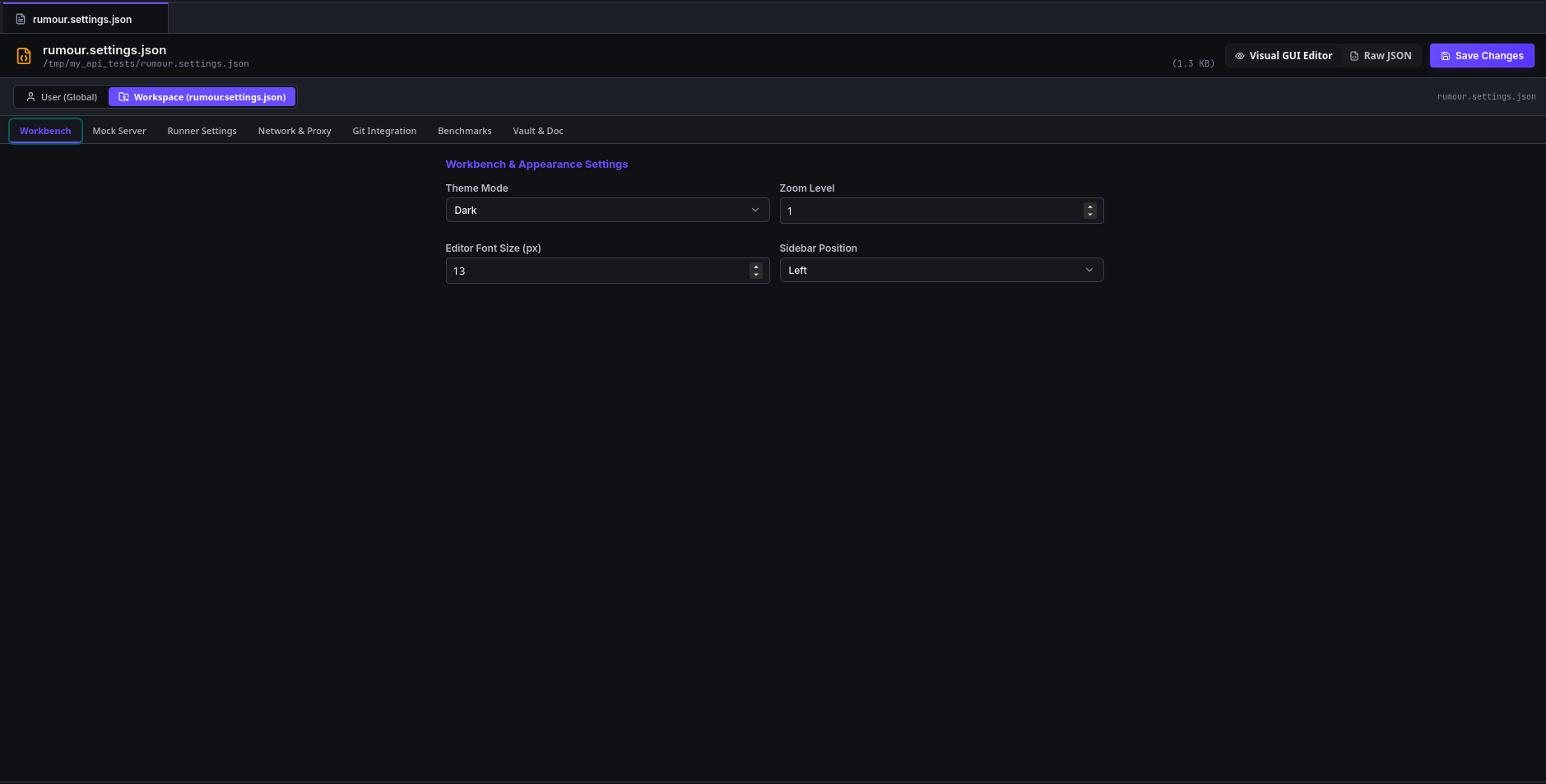
1. Opening the Settings Editor
You can launch the visual Settings Editor through several convenient entry points:
- Keyboard Shortcut: Press
Ctrl + ,(orCmd + ,on macOS). - Application Menu: Navigate to File > Settings in the top menu bar.
- File Explorer: Click on
rumour.settings.jsonin your workspace directory tree.
2. Configuration Scopes & Precedence
Rumour separates configuration into two distinct tiers:
| Scope | Storage Location | Application Scope | Precedence |
|---|---|---|---|
| User (Global) | ~/.config/rumour/settings.json (Linux/macOS)%APPDATA%\rumour\settings.json (Windows) | Applies across all workspaces on your workstation. Automatically saved on change. | Baseline default |
| Workspace | rumour.settings.json in project root | Scoped exclusively to the active workspace. Committable to Git for team consistency. | Highest (overrides User settings) |
The Scope Switcher Header
At the top of the Settings Editor, the persistent scope switcher allows toggling between scopes with a single click:
User (Global)(<User size={13} />): Modifies workstation-wide preferences stored in your OS application directory.Workspace (rumour.settings.json)(<FolderGit2 size={13} />): Modifies project-level preferences committed directly to the current repository.
3. Visual Settings Tabs
The Settings Editor organizes parameters into seven dedicated functional categories:
1. Workbench (workbench)
Controls interface appearance, typography, and visual scaling:
- Theme Mode: Choose between
Dark,Light, orSystem Default. - Zoom Level: Scale the interface DPI from
0.5xto2.0x(supports 4K and multi-monitor setups). - Editor Font Size: Adjust Monaco editor font size between
10pxand24px(default:13px). - Sidebar Position: Position the file tree dock on the
LeftorRight.
2. Mock Server (mock)
Configures default parameters for the local mock engine:
- Server Port & Host: Default port (
4000) and IP binding (127.0.0.1). - Global Delay (ms): Inject baseline artificial latency across all mock routes.
- CORS Origin: Pre-configured cross-origin headers (default:
*). - Watch & Verbose: Toggle auto-reload on
.tomlchanges and detailed debug output. - Snapshots: Toggle automated response record captures and designate storage directory (
.rumour/snapshots). - Reverse Proxy Target: Forward unhandled routes to live staging/production backends.
3. Runner Settings (run)
Global defaults for workspace workflow dispatch:
- Parallel Concurrency: Maximum concurrent requests during suite execution (default:
20). - Timeout (ms): Request execution deadline before timeout (default:
60,000ms). - Execution Flags:
Stop on First Failure: Halt suite immediately upon assertion error.Parallel Mode: Dispatch independent workflow steps concurrently.Self-Healing AI Retries: Automatically generate fallback assertions on minor structural diffs.Hard Healing: Enforce strict healing corrections.Auto-Cleanup: Remove transient temporary files after suite runs.Verbose: Stream detailed runtime tracing to standard output.
- Download Directory: Default filesystem target for binary response downloads.
4. Network & Proxy (network)
Corporate intranet and security transport settings:
- HTTP / HTTPS Proxy: Dedicated outbound proxy gateway URLs (e.g.
http://proxy.corp.internal:8080). - No-Proxy (Bypass List): Comma-separated hosts and domains bypassing proxy routing (e.g.
localhost, 127.0.0.1, .internal). - SSL Verification (
ssl_verify): Toggle strict SSL certificate validation for internal self-signed environments. - Default Request Timeout: Network socket timeout threshold.
5. Git Integration (git)
Source control dock preferences:
- Default File View Mode: Choose between collapsible directory
Tree Viewand flatList View. - Default Sort Order: Sort changes by
File Path,File Name, or changeStatus. - Auto-Stage Changes: Automatically stage modified files upon commit preparation.
6. Benchmarks (bench)
Load and stress testing defaults:
- Total Iterations: Benchmark sample volume (default:
100). - Concurrency: Parallel virtual worker count (default:
10).
7. Vault & Doc (vault, doc)
Secret encryption and documentation generation:
- Encrypted Vault Path: Filesystem location of encrypted variable store (default:
.rumour/vault.enc). - Vault Auto-Lock Timeout: Inactivity window before locking memory keys (default:
10 minutes). - Clipboard Auto-Clear: Automatically flush copied secrets from system clipboard (default:
30 seconds). - Documentation Output: Default output path for generated markdown documentation (default:
README.md).
4. rumour.settings.json Schema
All settings can be inspected, manually edited, or automated via standard JSON:
{
  "$schema": "https://rumour.dev/schema/settings.json",
  "version": 1,
  "workbench": {
    "theme": "dark",
    "zoom": 1.0,
    "font_size": 13,
    "sidebar_position": "left"
  },
  "network": {
    "http_proxy": null,
    "https_proxy": null,
    "no_proxy": null,
    "ssl_verify": true,
    "default_timeout_ms": 60000
  },
  "git": {
    "auto_stage": false,
    "default_view": "tree",
    "default_sort": "path"
  },
  "logging": {
    "level": "info",
    "syslog_enabled": true,
    "file_sink": true
  },
  "mock": {
    "port": 4000,
    "host": "127.0.0.1",
    "delay_ms": 0,
    "cors_origin": "*",
    "verbose": false,
    "watch": true,
    "source_path": ".",
    "manifest_file": "mock.manifest.json",
    "snapshots": {
      "enabled": false,
      "directory": ".rumour/snapshots"
    },
    "proxy": "",
    "save_toml": ""
  },
  "run": {
    "stop_on_fail": false,
    "parallel": false,
    "concurrency": 20,
    "timeout_ms": 60000,
    "delay_ms": 0,
    "heal": false,
    "hard_heal": false,
    "auto_cleanup": false,
    "verbose": false,
    "download_dir": null
  },
  "bench": {
    "iterations": 100,
    "concurrency": 10
  },
  "vault": {
    "path": ".rumour/vault.enc",
    "auto_lock_mins": 10,
    "clipboard_clear_secs": 30
  },
  "doc": {
    "output": "README.md"
  }
}
5. Error Recovery & Syntax Resilience
If rumour.settings.json contains malformed JSON (e.g. trailing commas or syntax mistakes), Rumour UI catches the parsing exception safely:
- Displays an inline Settings Format Error banner explaining the exact JSON parse issue.
- Protects existing workspace settings from corruption.
- Re-enables the full visual editor the moment the syntax is corrected.