HTTP Requests & Method Editor
The Request Builder is Rumour's primary interface for designing, configuring, debugging, and executing API operations visually. Rumour operates on a strict filesystem-as-source-of-truth philosophy: every configuration, header, query parameter, and payload body configured in the visual builder is bi-directionally synchronized with a human-readable *.toml file stored directly on your local disk.
Request Builder Anatomy
When you open or create any request in Rumour UI, the Request Builder occupies the central editor area. It is organized into three primary structural regions:
- Top Request Bar: Protocol selector, HTTP verb dropdown, Smart URL input with inline variable interpolation, execution trigger (
Run), Raw TOML toggle (), and file reload button (). - Behavior Control Strip: High-level execution flags (self-healing, dry run, auto cleanup, retries) and diagnostic actions (watch mode, session recorder/replay, profiling, in-scope variables flyout).
- Sub-Tab Navigation Area: Tabbed panels for detailed parameterization—headers, query parameters, multi-type payload bodies, upstream dependencies, response assertions, Rhai hooks, datasets, and Monaco raw file editing.
1. Top Request Bar
The persistent top toolbar provides immediate control over how the request is dispatched:
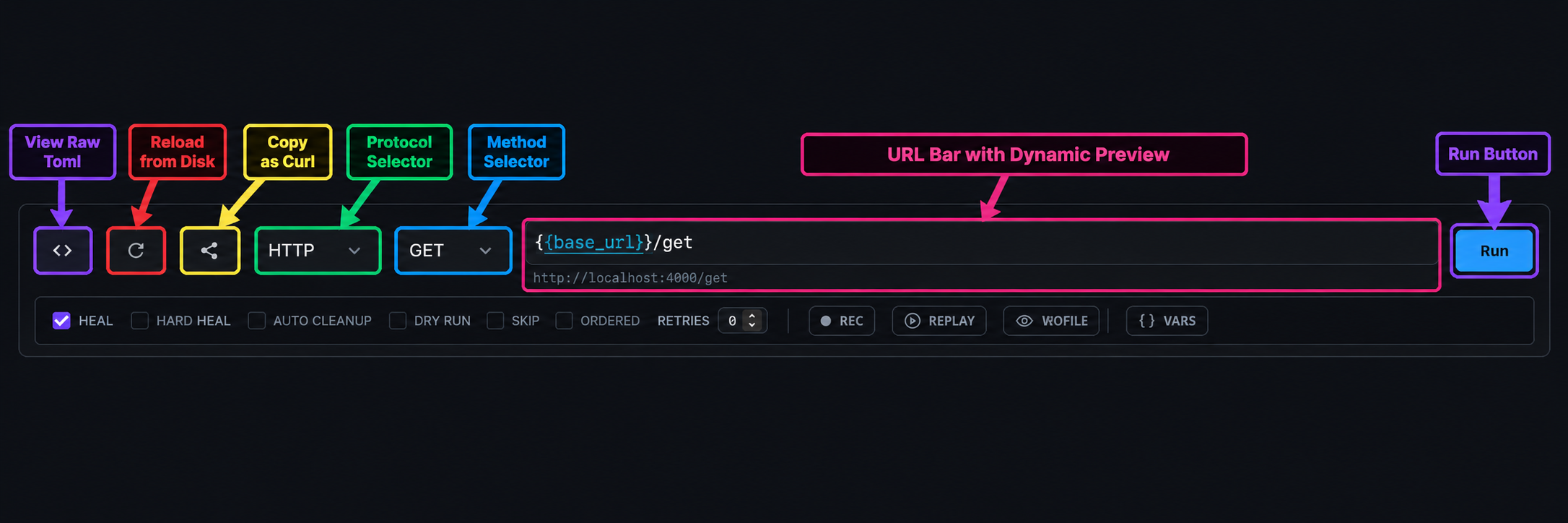
Action Buttons & Controls
| Icon / Control | Element | Shortcut | Description |
|---|---|---|---|
| Toggle Raw TOML | — | Instantly flips between the visual form builder and the syntax-highlighted Monaco Raw TOML editor without saving to disk. | |
| Reload from Disk | — | Re-reads the file from disk, discarding any unsaved in-memory edits. Essential when pulling Git changes or editing in VS Code. | |
| Copy as cURL | — | Serializes the active request into a compliant, executable curl command with all variables and headers fully interpolated. | |
HTTP ▾ | Protocol Selector | — | Switches between HTTP, GraphQL, WebSocket, gRPC, and MQTT. Switching protocols alters the available tabs and payload editors. |
GET ▾ | Method Selector | — | Selects the HTTP verb (GET, POST, PUT, PATCH, DELETE, HEAD, OPTIONS). Badges are color-coded for rapid identification. |
| — | URL Input Field | Ctrl + P (focus) | URL address bar supporting template interpolation ({{base_url}}/api/v1/users). Displays a real-time resolved URL preview below the input. |
Run | Execution Button | Ctrl + Enter / Cmd + Enter | Dispatches the request through rumour-core. Switches to a red Stop button while the request is in flight. |
Smart URL Input & Real-Time Parameter Merging
The URL bar features full integration with Rumour's variable system:
{{base_url}}/api/v2/users/{{user_id}}?active=true
- Inline Variable Autocomplete: Typing
{{triggers intellisense suggestions drawn from workspace environments, active session extractions, and built-in generators ({{$guid}},{{$timestamp}}). - Real-Time Resolved Preview: Immediately beneath the input field, Rumour renders the fully evaluated URL. Missing or unresolvable variables are flagged immediately before sending network packets.
- Query Parameter Synchronization: Appending
?key=valueto the URL bar automatically parses and updates the Params sub-tab. Conversely, adding parameters in the Params sub-tab automatically synchronizes the query string in the URL bar.
2. Request Specifications (Info Tab)
The Info tab acts as the documentation and execution configuration card for the request:
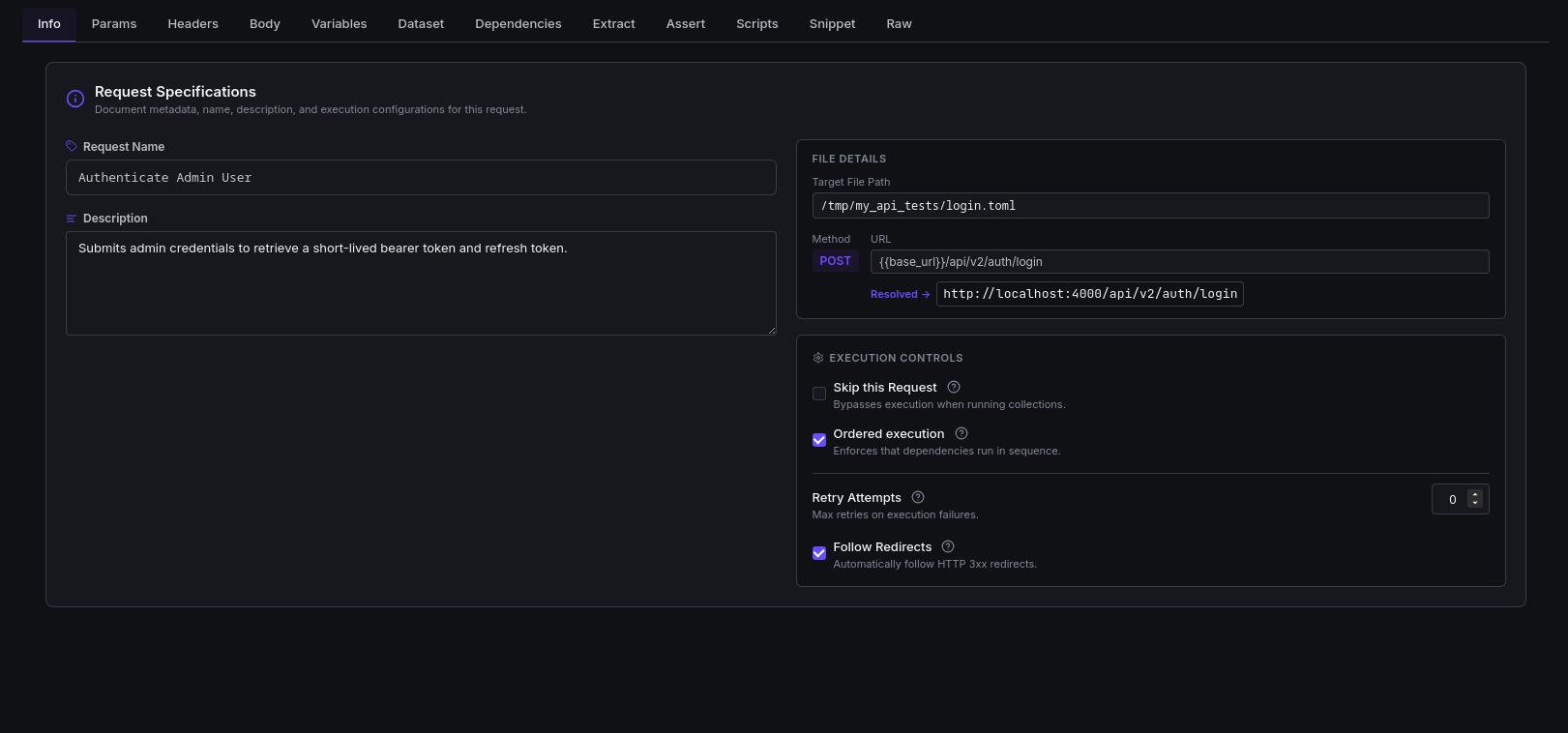
Metadata Fields
- Request Name: A human-readable display title (e.g.
Authenticate Admin User). When set, Rumour displays this name in the Left Sidebar tree explorer and Workflow execution cards instead of the raw filename. - Description: Markdown-compatible text area explaining the endpoint's purpose, authentication prerequisites, query expectations, and potential side-effects.
File Details Card
- Target File Path: Absolute local path to the backing
.tomlfile. Clicking the path automatically copies it to your system clipboard. - Method & URL Summary: Displays the active method verb alongside the raw parameterized URL and the real-time resolved URL.
Execution Controls
- Skip this Request: When checked (
skip = true), this request is excluded from automated collection and suite executions (rumour run .), but can still be executed manually with the Run button. - Ordered Execution: When checked (
ordered = true), the runner engine enforces that all prerequisite upstream dependencies execute in strict sequential order rather than in parallel pools. - Retry Attempts: Configurable numeric stepper (0 to 10). Specifies the maximum retry attempts upon network dropouts or assertion failures before marking the node failed.
- Follow Redirects: When checked (
follow_redirects = true), the HTTP client automatically follows HTTP3xxredirects (e.g.301 Moved Permanently,302 Found,307 Temporary Redirect).
Backing TOML Representation
ordered = true
name = "Authenticate Admin User"
description = "Submits admin credentials to retrieve a short-lived bearer token and refresh token."
follow_redirects = true

[request]
method = "POST"
url = "{{base_url}}/api/v2/auth/login"

[body]
type = "json"
raw = "{\n  \"email\": \"test@example.com\",\n  \"password\": \"123456\"\n}"

[extract]
token = "token"
3. Query Parameters (Params Tab)
The Params tab provides a key-value spreadsheet editor for HTTP query and path parameters:
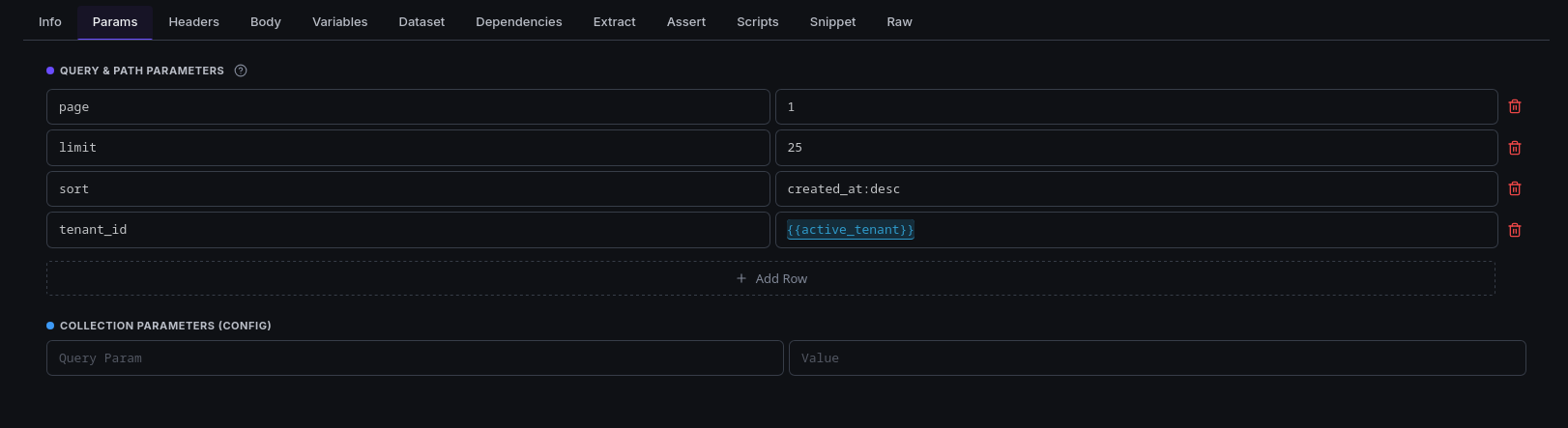
- Key & Value Inputs: Key-value pairs supporting variable interpolation (
{{page_size}}). - Automatic Row Addition: Typing in the last row automatically creates a new empty row beneath it.
- Row Deletion: Clicking the trash icon () removes individual parameters.
- URL Synchronization: Any change to keys or values immediately updates the query string in the main URL bar via
useParamSync.
Inherited Collection Parameters
Beneath the request's local parameters, Rumour displays a read-only section: Collection Parameters (Config). These are query parameters defined at the parent folder level (collection.config.toml or workspace.env.toml) that automatically append to every request within that directory tree.
Backing TOML Representation
[params]
page = "1"
limit = "25"
sort = "created_at:desc"
tenant_id = "{{active_tenant}}"
4. Request Headers (Headers Tab)
The Headers tab provides complete control over outgoing HTTP request headers:
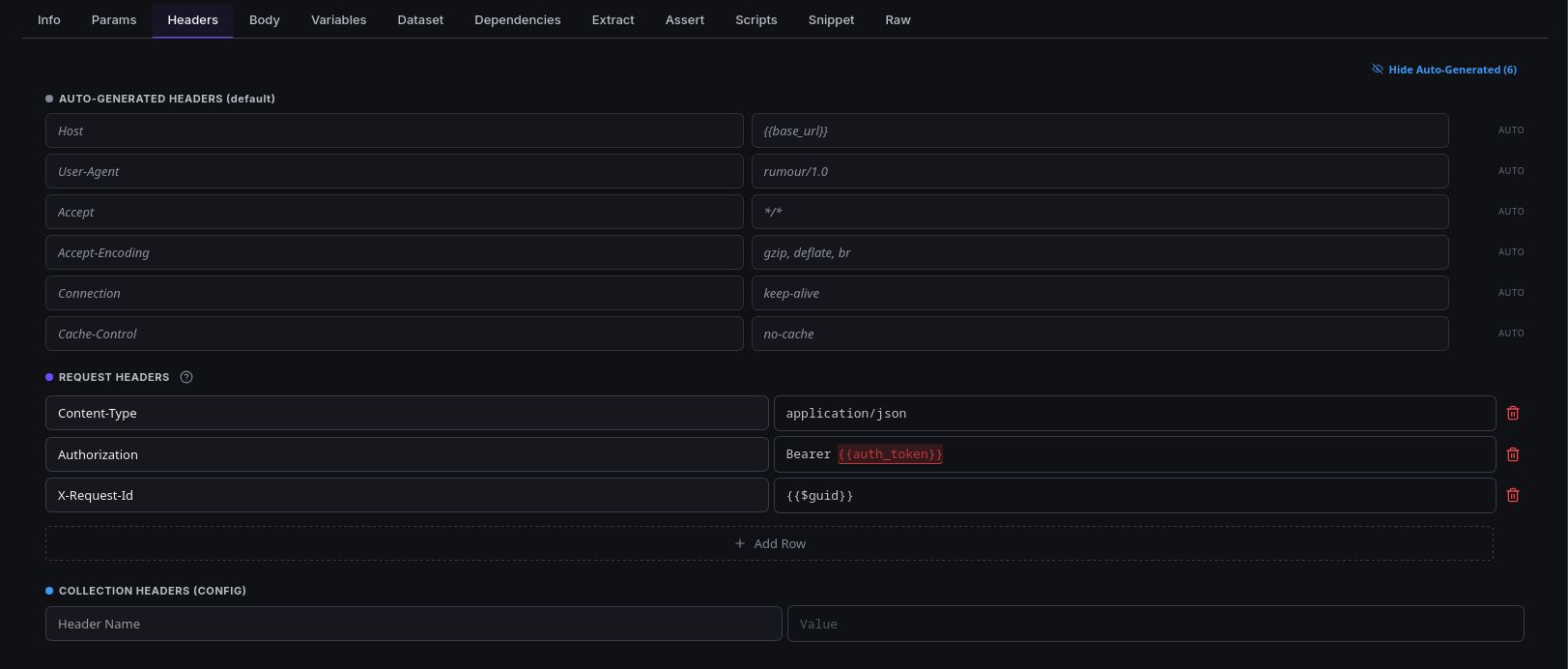
Auto-Generated Headers Inspection
Rumour's underlying HTTP engine automatically provides compliant default headers for outgoing requests:
Host: Auto-calculated from the target host and port.User-Agent: Defaults torumour/1.0.Accept: Defaults to*/*.Accept-Encoding: Defaults togzip, deflate, br.Connection: Defaults tokeep-alive.Cache-Control: Defaults tono-cache.
Click the Show Auto-Generated button () at the top of the tab to inspect these headers. If you define an identical header in the custom table, Rumour displays an overridden badge indicating that your custom value will be transmitted over the wire instead.
Custom Headers Editor
- Header Name Autocomplete: Features built-in autocomplete for standard HTTP headers (
Authorization,Content-Type,Accept,X-Api-Key,X-Correlation-Id, etc.). - Common Values Autocomplete: Selecting headers such as
Content-Typeautomatically suggests standard MIME types (application/json,application/x-www-form-urlencoded,multipart/form-data, etc.). - Template Variables: Both header keys and header values support variable interpolation (
Bearer {{auth_token}}).
Collection Inherited Headers
Headers configured in a parent folder's collection.config.toml are displayed in the Collection Headers (Config) section. If a local header shares the same name as an inherited header, the local header takes precedence and overrides the inherited value.
Backing TOML Representation
[headers]
"Content-Type" = "application/json"
"Authorization" = "Bearer {{auth_token}}"
"X-Request-Id" = "{{$guid}}"
5. Body Payloads (Body Tab)
The Body tab adapts dynamically based on the selected payload encoding:
1. JSON Payload (application/json)
- Monaco Code Editor: Line numbers, syntax highlighting, bracket matching, and code folding.
- Template-Aware JSON Validation: Rumour's validator distinguishes between invalid JSON syntax and Rumour template variables. You can write
"id": {{user_id}}or"active": {{is_active}}without syntax errors. - JSON Prettifier (Format): Click the wand icon ( Format) to automatically re-indent and clean up unformatted JSON.
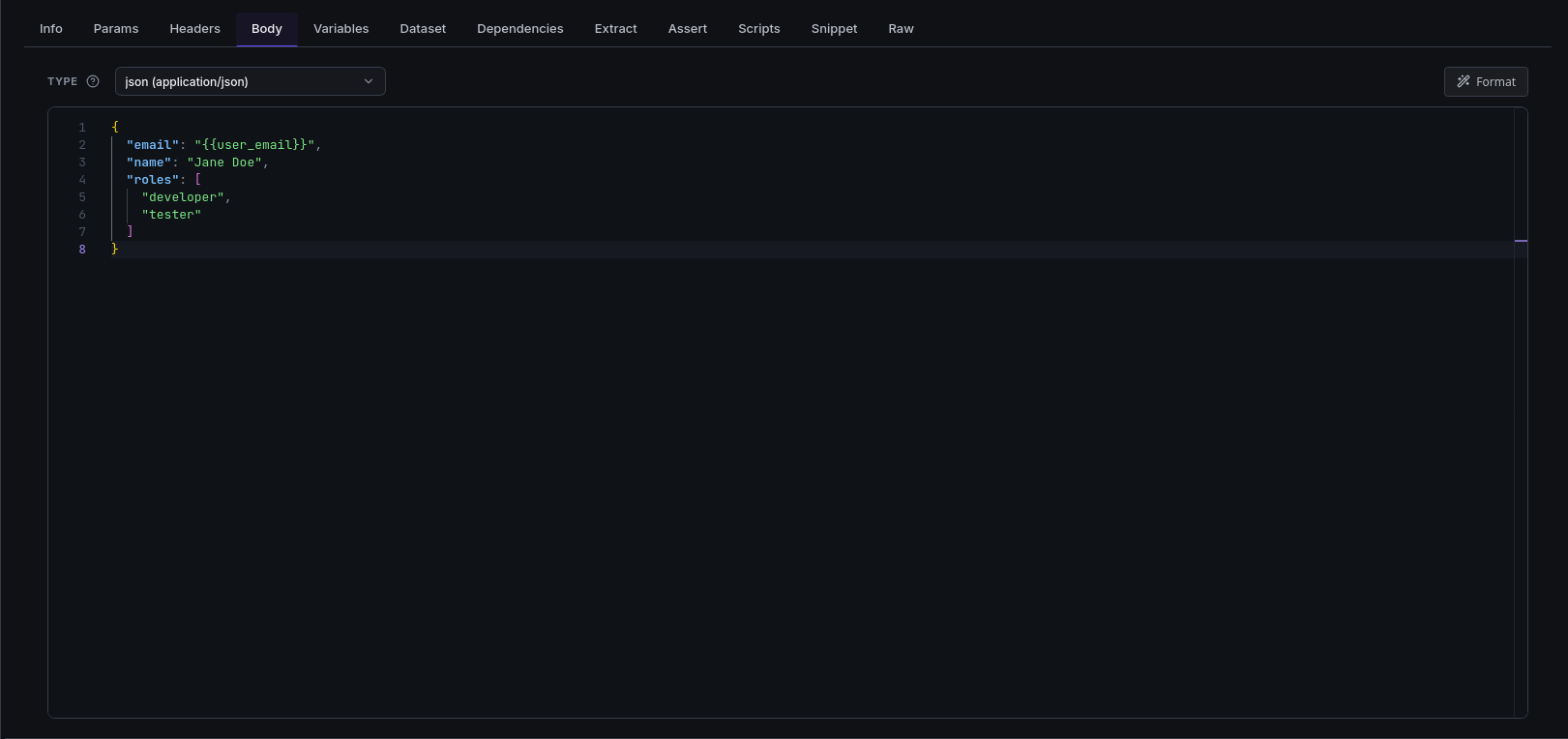
Backing TOML Representation
[body]
type = "json"
raw = '''
{
  "email": "{{user_email}}",
  "name": "Jane Doe",
  "roles": ["developer", "tester"]
}
'''
2. Text / Raw (text/plain)
Use the text mode to dispatch plain text, XML, YAML, GraphQL queries, or custom payload formats:
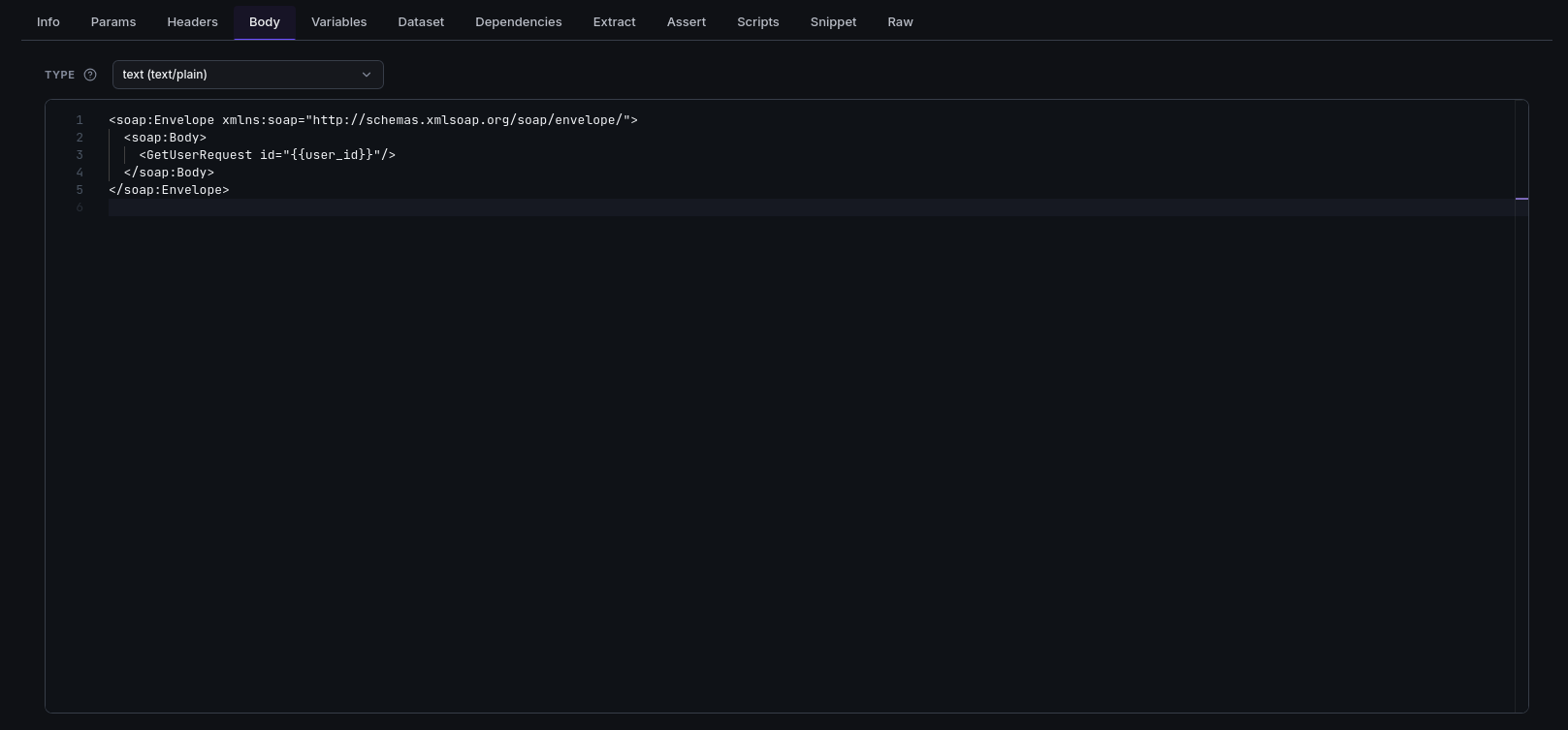
Backing TOML Representation
[body]
type = "text"
raw = '''
<soap:Envelope xmlns:soap="http://schemas.xmlsoap.org/soap/envelope/">
  <soap:Body>
    <GetUserRequest id="{{user_id}}"/>
  </soap:Body>
</soap:Envelope>
'''
3. Binary Payloads (application/octet-stream)
For file uploads, firmware images, PDFs, or binary buffers:
- Select binary in the Type dropdown.
- Click Select File () to open the system file picker dialog.
- Rumour stores the relative path prefixed with an
@symbol.
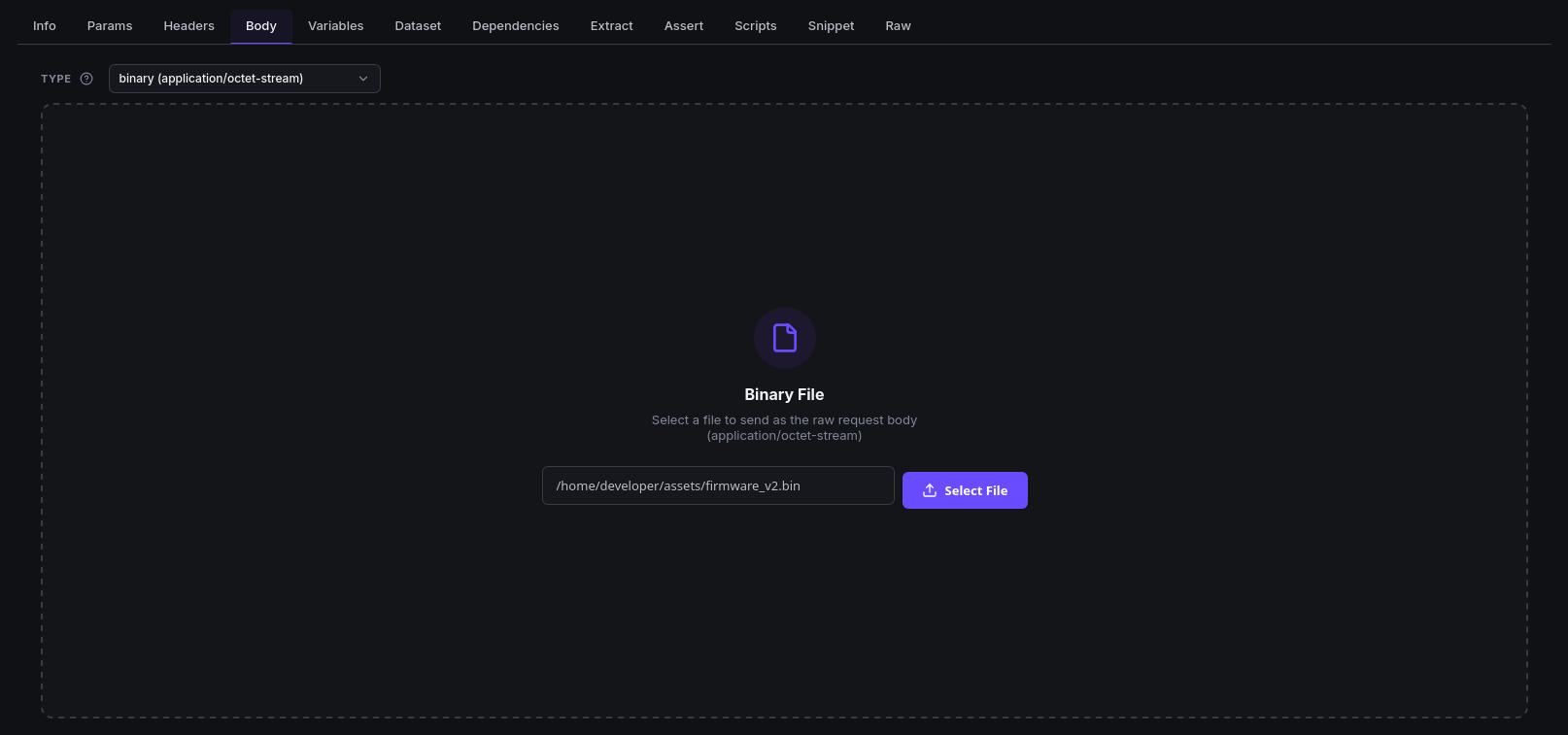
Backing TOML Representation
[body]
type = "binary"
raw = "@/home/developer/assets/firmware_v2.bin"
4. Form Data (multipart/form-data)
For HTML forms and file upload endpoints:
- Add key-value rows.
- Select the row type: Text (string field) or File (native file picker attachment).
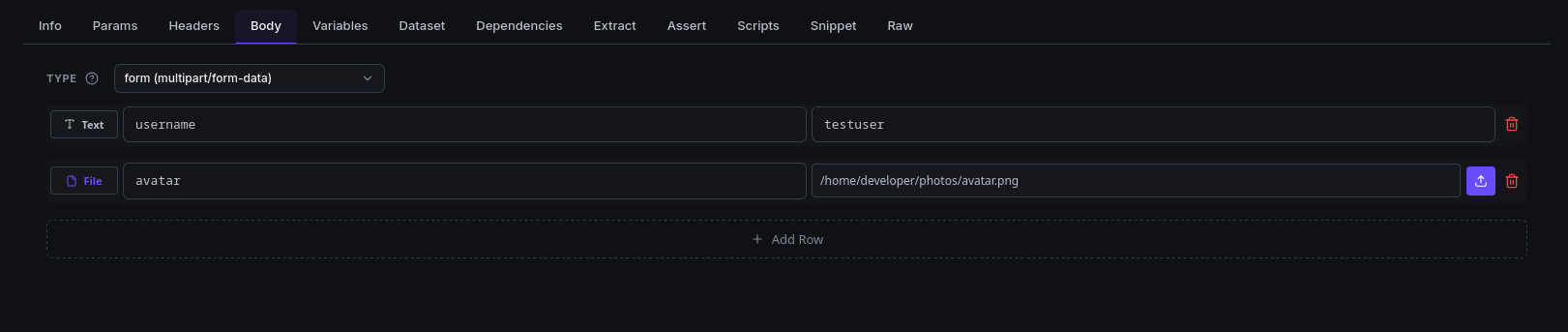
Backing TOML Representation
[body]
type = "form"
raw = '''
username=testuser
avatar=@/home/developer/photos/avatar.png
'''
6. Code Snippets (Snippet Tab)
The Snippet tab generates ready-to-use client code snippets for pasting requests into application codebases:
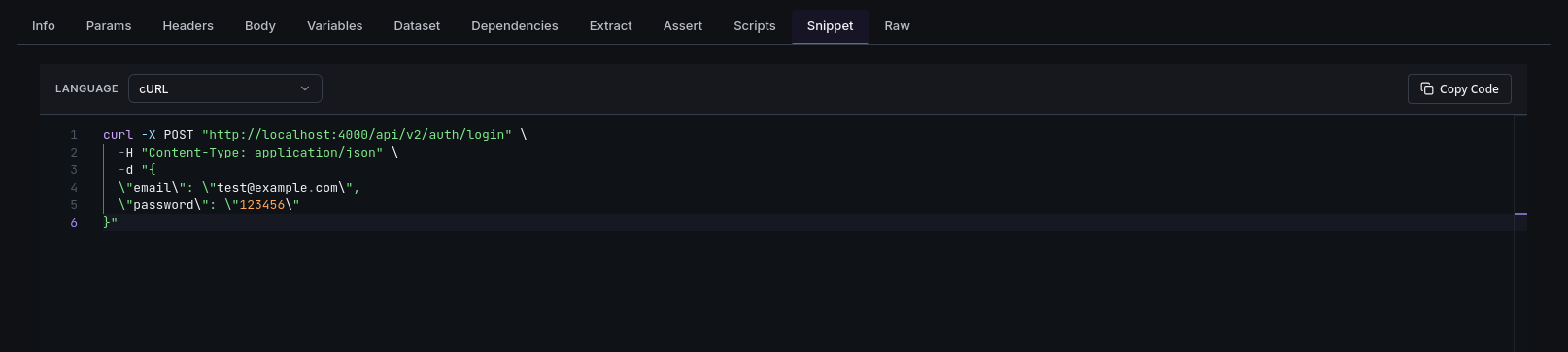
Supported Languages & Libraries
- cURL: POSIX-compliant terminal command.
- JavaScript (Fetch): Standard modern browser and Node.js
fetchAPI. - JavaScript (Axios): Popular HTTP client for Node and frontends.
- Python (requests): Pythonic
requests.request()syntax. - Python (http.client): Zero-dependency standard library implementation.
- Go (net/http): Native Go standard library client.
- Rust (reqwest): Async
reqwest::Clientbuilder implementation.
Variable Substitution in Snippets
Rumour resolves all variables ({{base_url}}, {{token}}) in the snippet preview so that the generated code is immediately runnable. Click Copy Code () to copy the generated snippet to your clipboard with confirmation toast feedback.
7. Raw TOML Editor & Error Recovery Mode
Rumour provides two complementary modes for editing and recovering .toml files directly:
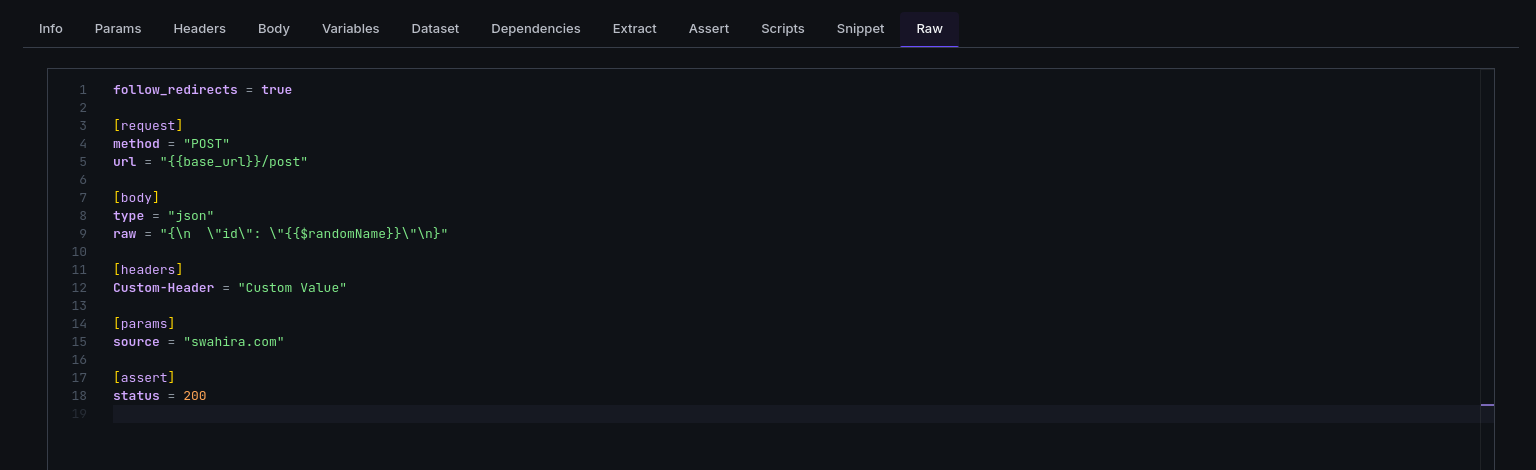
Visual to Raw TOML Toggle ()
Clicking the button in the Request Bar switches the central editor to the Raw Editor. This embeds a full Monaco editor displaying the backing .toml file.
- Any edit made in the Raw editor immediately synchronizes back to the visual builder.
- Press
Ctrl + Sto save changes directly to disk.
Automatic Error Recovery Mode
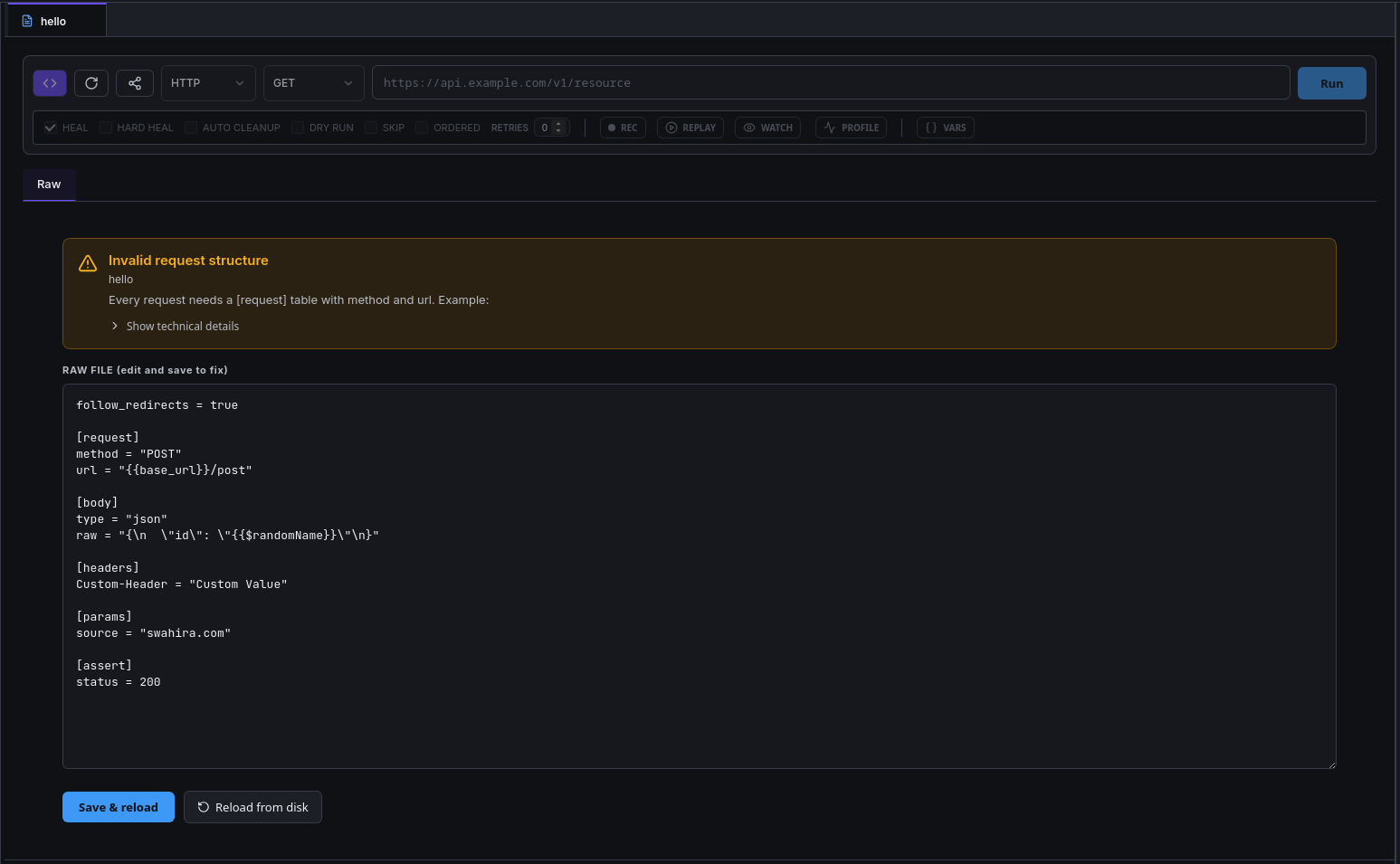
If a .toml file is damaged externally (e.g. invalid syntax written in an external editor, missing [request] table, or an empty file), Rumour enters Recovery Mode instead of crashing:
- Empty Request File: Displays starter buttons with sparkle icons () to generate a valid
GETorPOSTtemplate with a single click. - Invalid TOML Syntax: Displays an alert banner () with an expandable technical stack trace showing the exact line and column of the syntax error. Developers can fix the text in the embedded editor and click Save & reload.
- Missing Collection Settings: Provides an Initialize Collection Settings button to scaffold folder-level headers and variables automatically.
Keyboard Shortcuts Summary
| Shortcut | Action | Scope |
|---|---|---|
Ctrl + Enter / Cmd + Enter | Run active request | Everywhere in Request Builder |
Ctrl + S / Cmd + S | Force save current file to disk | Everywhere |
Ctrl + J / Cmd + J | Toggle Bottom Response Panel | Everywhere |
Tab / Shift + Tab | Navigate across Key-Value input rows | Params / Headers / Variables tables |
Enter (inside Key-Value input) | Run request or add row | Tables |