Multi-Protocol Support (GraphQL, WS, gRPC, MQTT)
While standard REST/HTTP represents a significant portion of modern web APIs, distributed architectures and real-time systems rely on event streams, message brokers, and binary RPC frameworks. Rumour UI integrates first-class visual interfaces for GraphQL, WebSockets, gRPC, and MQTT directly within the same unified workspace.
Switching protocols in the Request Bar dynamically adapts the Request Builder's input forms, sub-tabs, payload editors, assertion options, and underlying .toml file structure.
Protocol Selector
In the top Request Bar, the Protocol Dropdown allows instant switching between protocols:
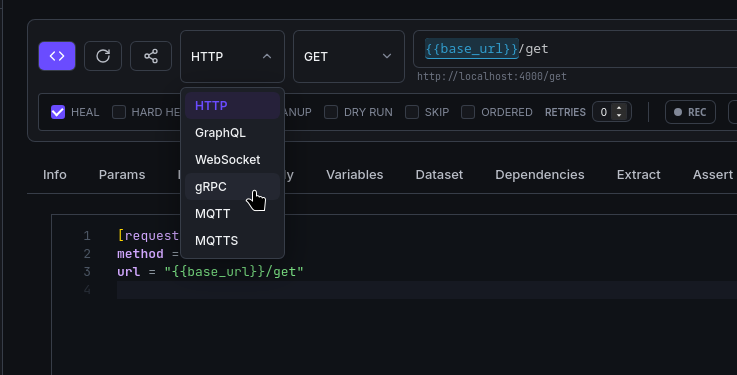
1. GraphQL Workflows
Selecting GraphQL in the protocol dropdown configures the Request Builder for GraphQL schema querying, mutations, and variable binding:
Specialized GraphQL Editor (Body Sub-Tab)
When GraphQL mode is active, the Body sub-tab provides four dedicated configuration panels:
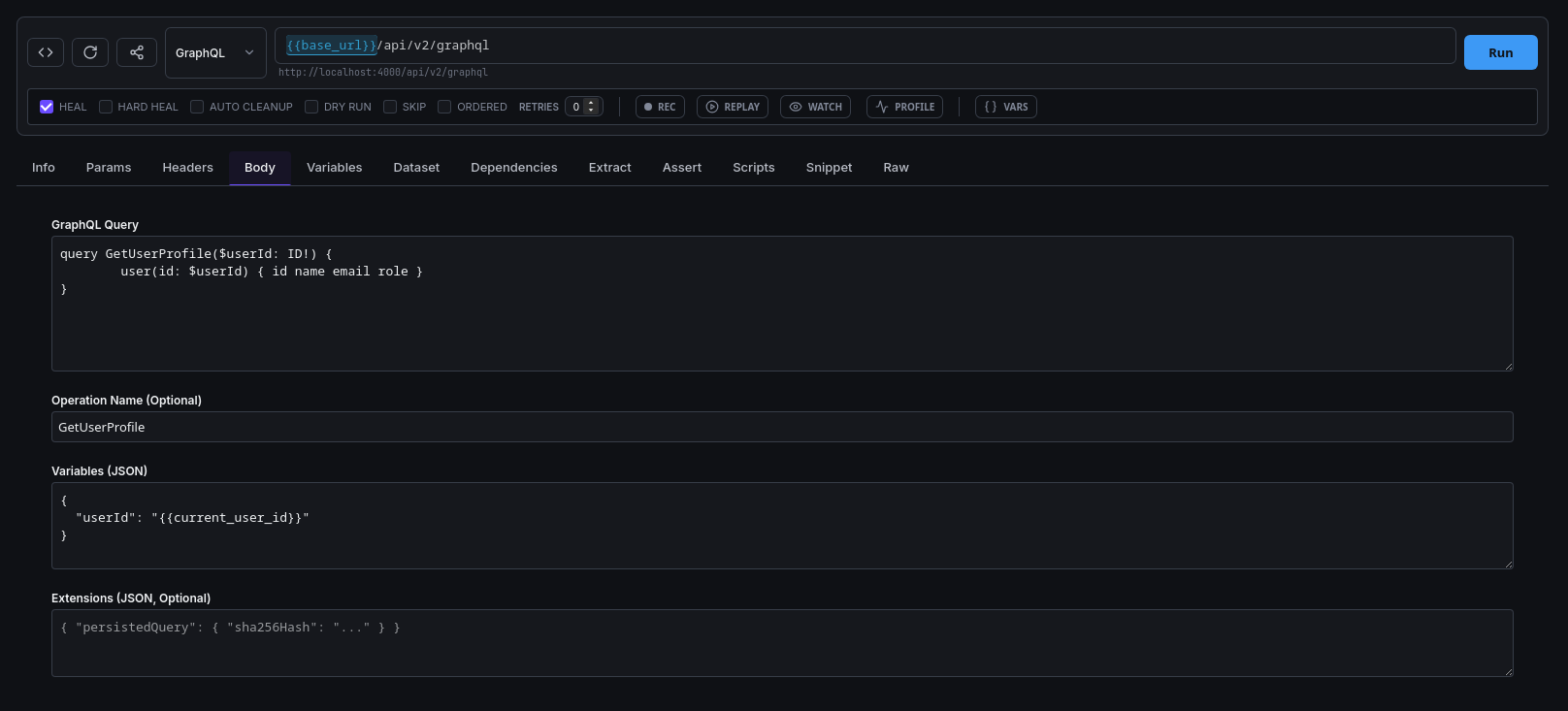
- GraphQL Query Editor:
- Multi-line editor for queries, mutations, and subscriptions.
- Supports parameter declarations (
query GetUser($id: ID!)). - Supports Rumour template variable interpolation directly in the query string (
{{user_id}}).
- Operation Name (Optional):
- Input field to designate the active operation when the query document contains multiple named operations (e.g.
GetUserProfile).
- Input field to designate the active operation when the query document contains multiple named operations (e.g.
- Variables (JSON):
- Dedicated JSON text editor for GraphQL variables (e.g.
{ "id": "{{active_id}}" }).
- Dedicated JSON text editor for GraphQL variables (e.g.
- Extensions (JSON, Optional):
- JSON input for GraphQL extensions such as Automatic Persisted Queries (
persistedQuery) or tracing metadata.
- JSON input for GraphQL extensions such as Automatic Persisted Queries (
GraphQL Error Assertions & Extraction
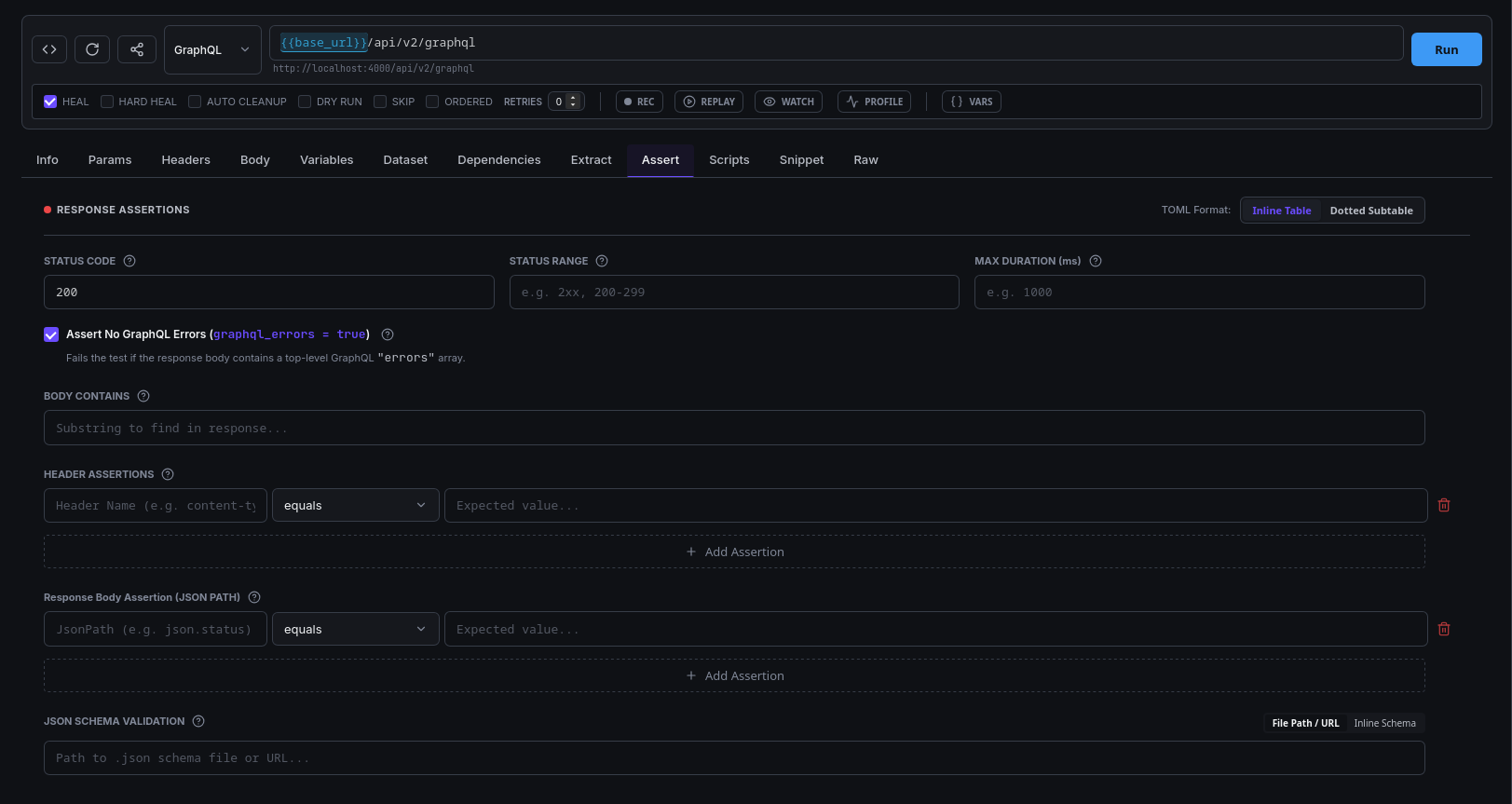
- No GraphQL Errors Checkbox: In the Assert sub-tab, checking Assert No GraphQL Errors (
graphql_errors = true) automatically fails the request if the server response contains a top-level"errors"array, even if the HTTP status code is200 OK. - Response Extractions: Extractions from GraphQL payloads access the response tree under
json.data.*(e.g.json.data.user.idorjson.errors[0].message). - Rhai Hook Context: In Rhai scripts, access
ctx.graphql_dataandctx.graphql_errors.
Backing TOML Representation
protocol = "graphql"
follow_redirects = true

[graphql]
query = "query GetUserProfile($userId: ID!) {\n        user(id: $userId) { id name email role }\n}"
operation_name = "GetUserProfile"

[graphql.variables]
userId = "{{current_user_id}}"

[assert]
status = 200
graphql_errors = true

[request]
url = "{{base_url}}/api/v2/graphql"
method = "POST"
2. WebSockets (Real-Time Streams)
Selecting WebSocket configures Rumour for bi-directional streaming over ws:// or wss:// endpoints:
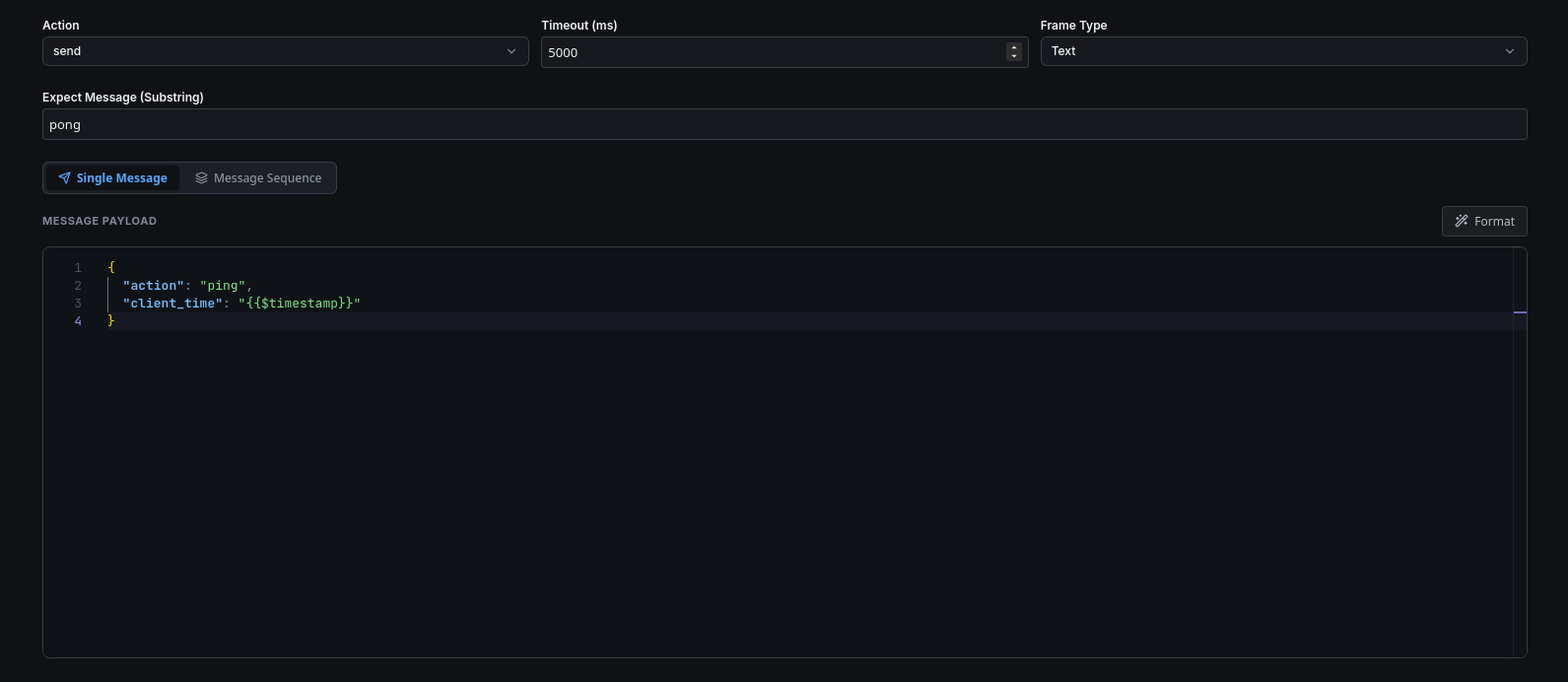
Connection & Action Settings
- Action Dropdown:
connect: Opens a connection, executes the handshake, and validates connectivity.send: Connects and transmits message payloads.listen: Waits for incoming frames from the server until the timeout expires.close: Sends a clean WebSocket closing frame.
- Timeout (ms): Milliseconds to wait for connections or incoming frames (default:
5000). - Expect Message (Substring): Validates that an incoming frame contains a specified substring (e.g.
pongorauthenticated).
Message Dispatching Modes
When send action is selected, Rumour offers two sending modes:
1. Single Message Mode ()
- Frame Type: Select between Text (UTF-8 payload) and Binary (Base64 payload).
- Uses the standard Body Editor with Monaco syntax highlighting and template interpolation.
2. Message Sequence Mode ()
Click Message Sequence to build multi-frame, ordered streaming pipelines:
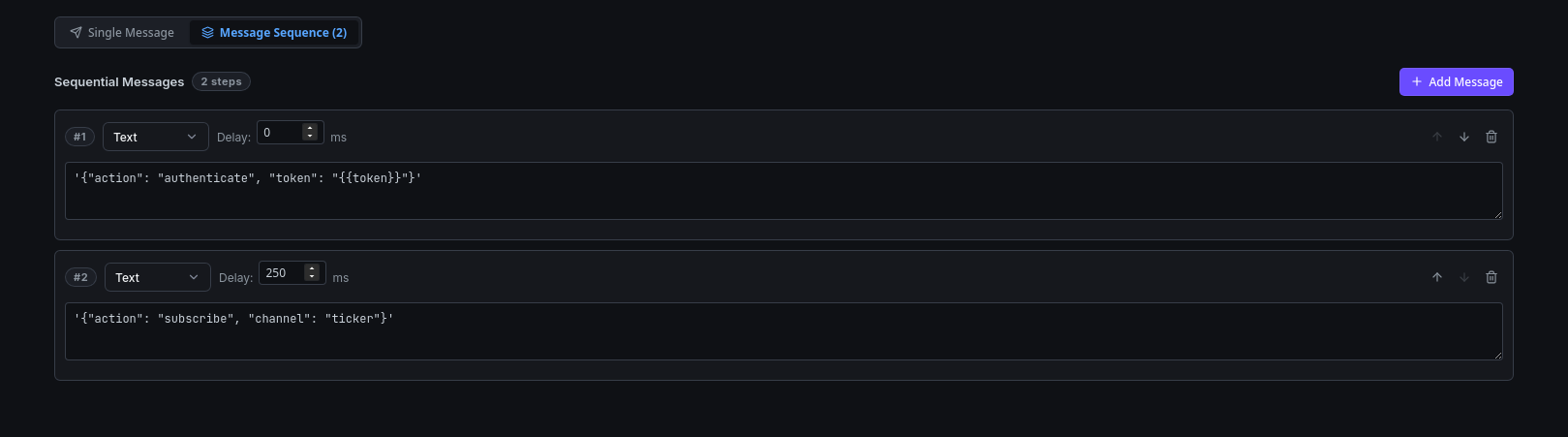
- Sequential Steps: Click Add Message () to add frame cards.
- Per-Step Frame Type: Toggle between Text and Binary per frame.
- Inter-Message Delay (
delay_ms): Set millisecond pauses between outgoing frames to simulate realistic client interaction patterns. - Step Reordering: Use the Up () and Down () buttons, or remove with Delete () to manage execution order.
- Rhai Hook Context: Access
ctx.ws_messageandctx.ws_messagesin script hooks.
Backing TOML Representation
protocol = "websocket"

[request]
url = "ws://localhost:4000/stream"

[websocket]
action = "send"
timeout_ms = 5000
expect_message = "order_confirmed"
messages = [
  { text = '{"type": "auth", "token": "{{auth_token}}"}', delay_ms = 0 },
  { text = '{"type": "subscribe", "channel": "ticker"}', delay_ms = 200 }
]

[assert]
body_contains = "order_confirmed"
3. gRPC (Remote Procedure Calls)
Selecting gRPC configures the Request Builder for high-performance Protocol Buffer RPC testing:
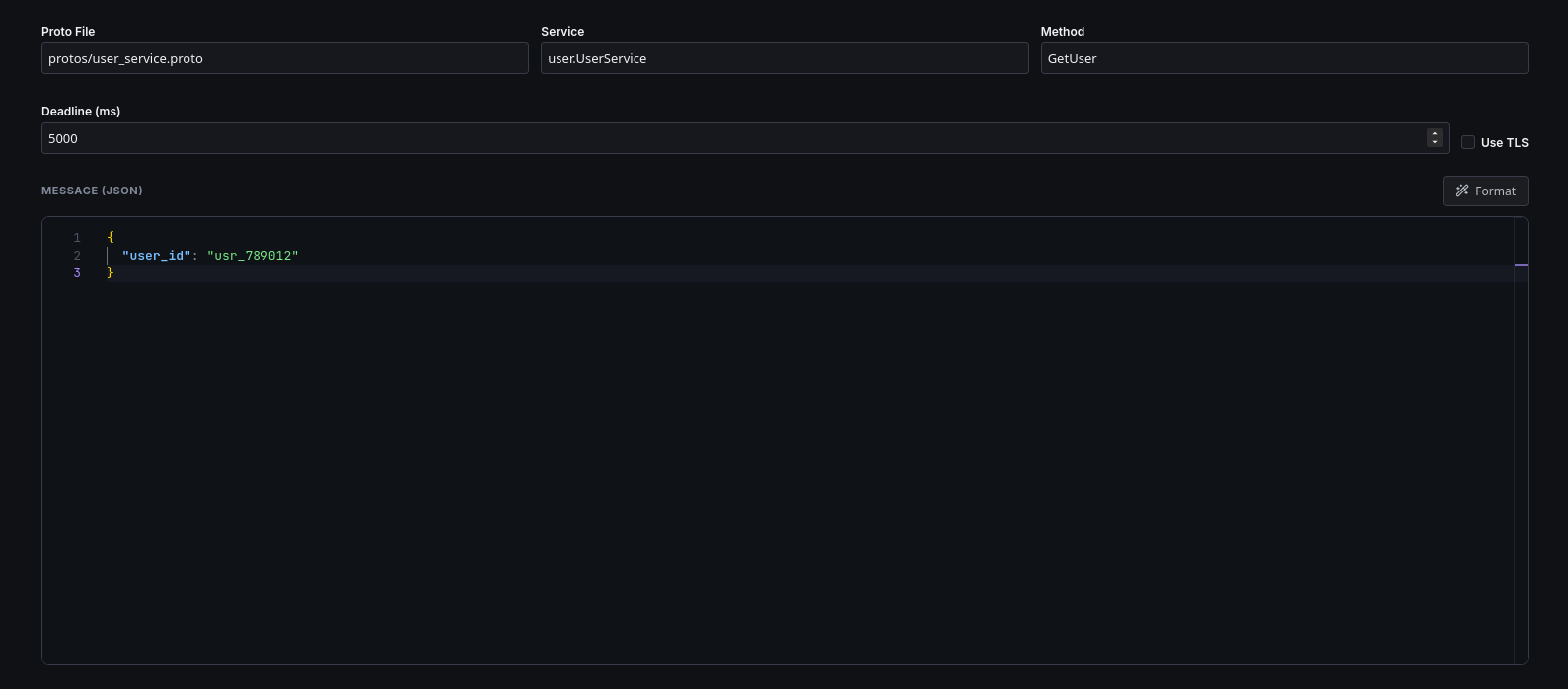
Protocol Configuration Fields
Directly in the Body sub-tab:
- Proto File: Relative or absolute path to the
.protoservice definition file (e.g.protos/user_service.proto). - Service: Qualified Protobuf service name (e.g.
user.UserService). - Method: Target RPC method name (e.g.
GetUserorUpdateProfile). - Deadline (ms): Client-side RPC timeout in milliseconds (e.g.
5000). - Use TLS: Checkbox to toggle secure transport (TLS/SSL).
Message Payload & Metadata
- Payload Editor: Write message payloads as JSON. Rumour automatically maps JSON fields to the compiled Protobuf schema structures.
- Request Metadata: Configure gRPC custom metadata key-values in the Headers sub-tab.
gRPC Status Assertions
In the Assert sub-tab, the standard HTTP status input switches to Expected gRPC Status:
- Select from standard gRPC status codes:
0 - OK,1 - CANCELLED,2 - UNKNOWN,3 - INVALID_ARGUMENT,4 - DEADLINE_EXCEEDED,5 - NOT_FOUND,6 - ALREADY_EXISTS,7 - PERMISSION_DENIED,16 - UNAUTHENTICATED, etc. - In Rhai scripts, access
ctx.grpc_metadataandctx.grpc_status.
Backing TOML Representation
protocol = "grpc"

[request]
url = "localhost:50051"

[grpc]
proto_file = "protos/user_service.proto"
service = "user.UserService"
method = "GetUser"
deadline_ms = 5000
tls = false

[headers]
"authorization" = "Bearer {{grpc_token}}"

[body]
type = "json"
raw = '''
{
  "user_id": "usr_789012"
}
'''

[assert]
grpc_status = 0
"json.user.active" = { equal = true }
4. MQTT & MQTTS (Message Queuing Telemetry Transport)
Selecting MQTT enables testing for IoT telemetry, pub/sub brokers, and event pipelines:
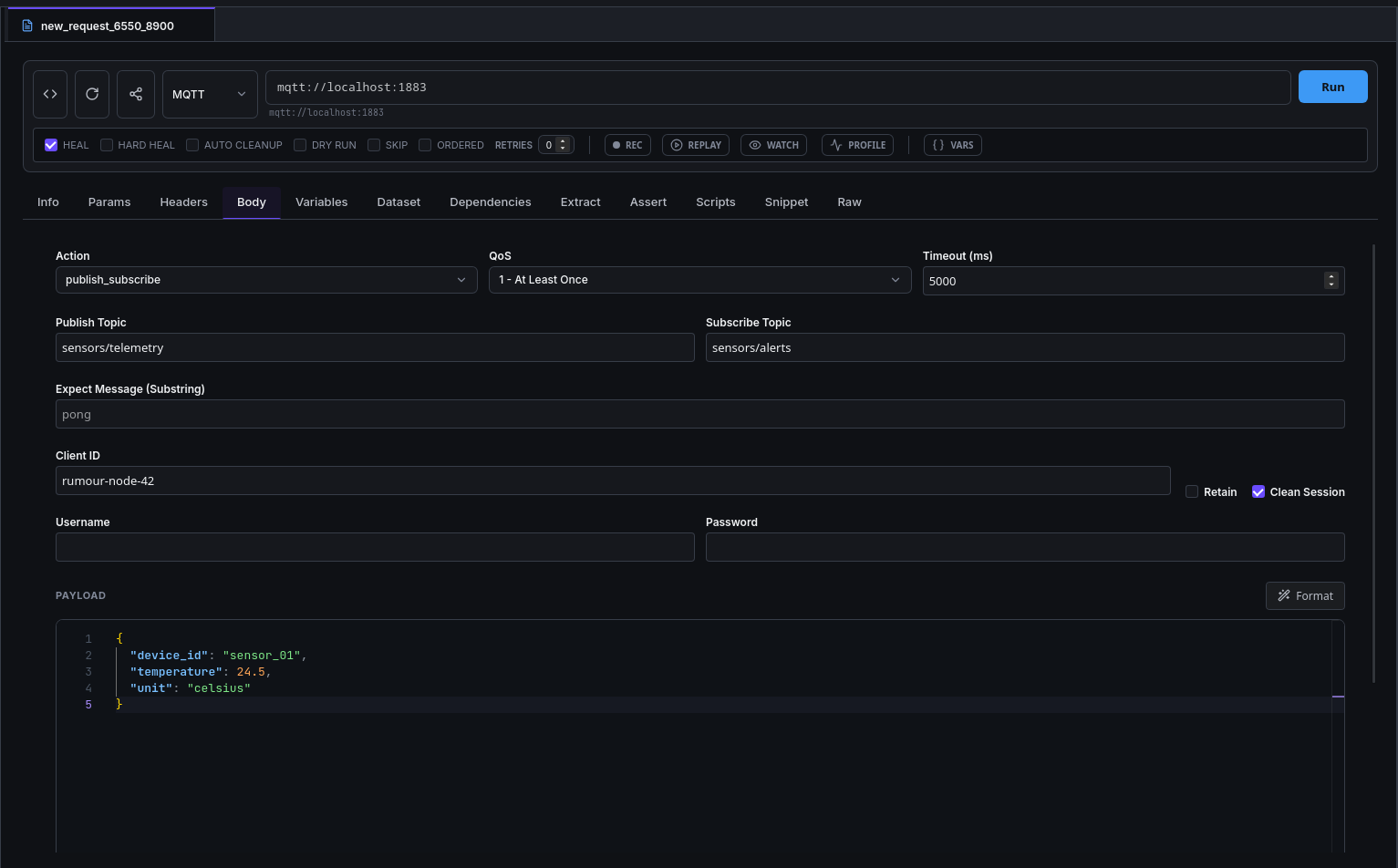
Broker Connection & Actions
- Broker Endpoint: Standard broker URLs (
mqtt://broker.hivemq.com:1883or securemqtts://...). - Action Dropdown:
publish: Dispatches a message to a topic.subscribe: Listens to a topic for incoming messages.publish_subscribe: Publishes a message and verifies an incoming message on a response topic.
- Quality of Service (QoS):
0 - At Most Once: Best-effort fire-and-forget.1 - At Least Once: Guaranteed delivery with acknowledgment.2 - Exactly Once: Four-step handshake ensuring single delivery.
- Topics:
- Publish Topic: Target topic to write messages to (e.g.
sensors/living_room/temp). - Subscribe Topic: Topic to listen on (defaults to the publish topic if left blank).
- Publish Topic: Target topic to write messages to (e.g.
- Client Identification & Session:
- Client ID: Custom identifier or auto-generated
rumour-{{$uuid}}. - Clean Session: Checkbox to request a transient session (
clean_session = true). - Retain: Checkbox instructing the broker to persist the last message on the topic (
retain = true).
- Client ID: Custom identifier or auto-generated
- Authentication: Optional Username and Password inputs for authenticated brokers.
- Expect Message: Substring match on incoming payloads.
- Rhai Hook Context: In Rhai scripts, access
ctx.mqtt_topicandctx.mqtt_payload.
Backing TOML Representation
protocol = "mqtt"

[request]
url = "mqtt://localhost:1883"

[mqtt]
action = "publish_subscribe"
topic = "sensors/telemetry"
subscribe_topic = "sensors/alerts"
qos = 1
timeout_ms = 5000
client_id = "rumour-node-42"
clean_session = true
retain = false
expect_message = "HIGH_TEMPERATURE"

[body]
type = "json"
raw = '''
{
  "device_id": "sensor_01",
  "temperature": 105.2,
  "unit": "celsius"
}
'''

[assert]
body_contains = "HIGH_TEMPERATURE"
Multi-Protocol Chaining in Workflows
Rumour's dependency and variable extraction architecture operates seamlessly across protocols. You can declare dependencies between completely different protocol requests:
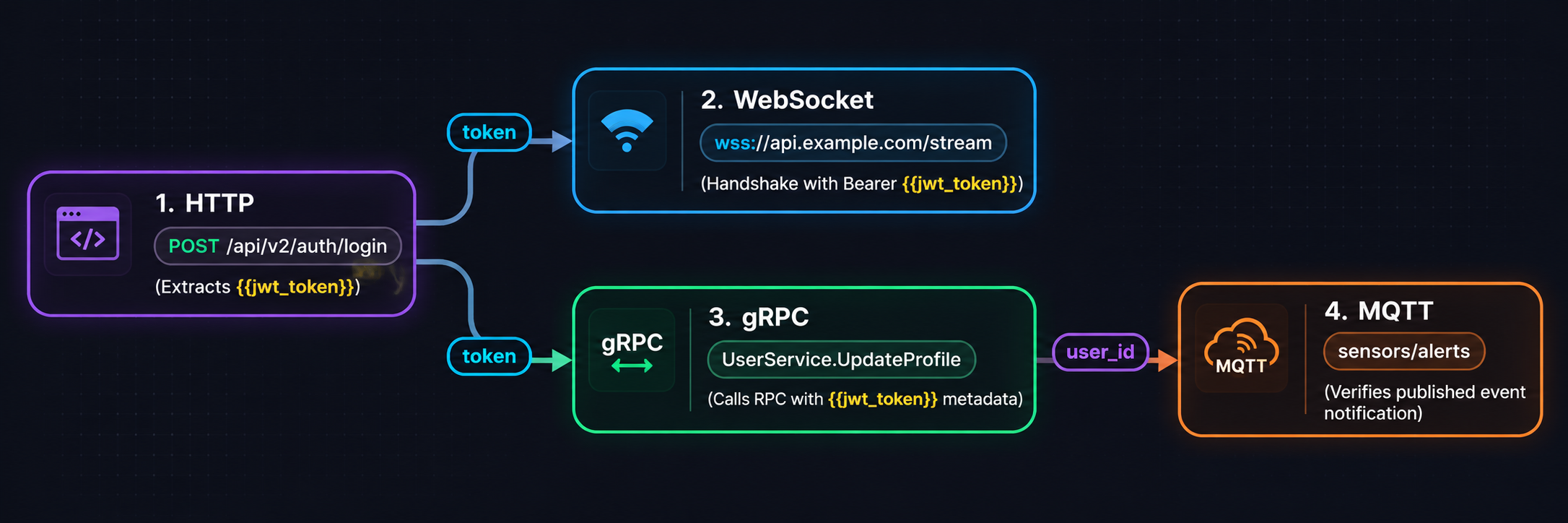
- Step 1 (HTTP): Authenticate with a standard REST API to retrieve a signed JWT token.
- Step 2 (WebSocket): Connect to a streaming endpoint passing the extracted token in handshake headers.
- Step 3 (gRPC): Call a protobuf RPC method using the extracted token in custom gRPC metadata.
- Step 4 (MQTT): Verify that the backend service published an event notification to an MQTT topic.