Datasets, Assertions & Scripts
Beyond simple single-endpoint requests, Rumour empowers developers to build enterprise-grade, resilient API workflows. The Request Builder provides dedicated sub-tabs to configure data-driven iterations, declarative DAG dependency wiring, dynamic state extractions, multi-criteria assertions, JSON Schema validation, and Rhai lifecycle hooks.

1. Datasets (Dataset Tab)
The Dataset tab enables data-driven testing by binding tabular data to request parameters, URLs, headers, and body payloads:
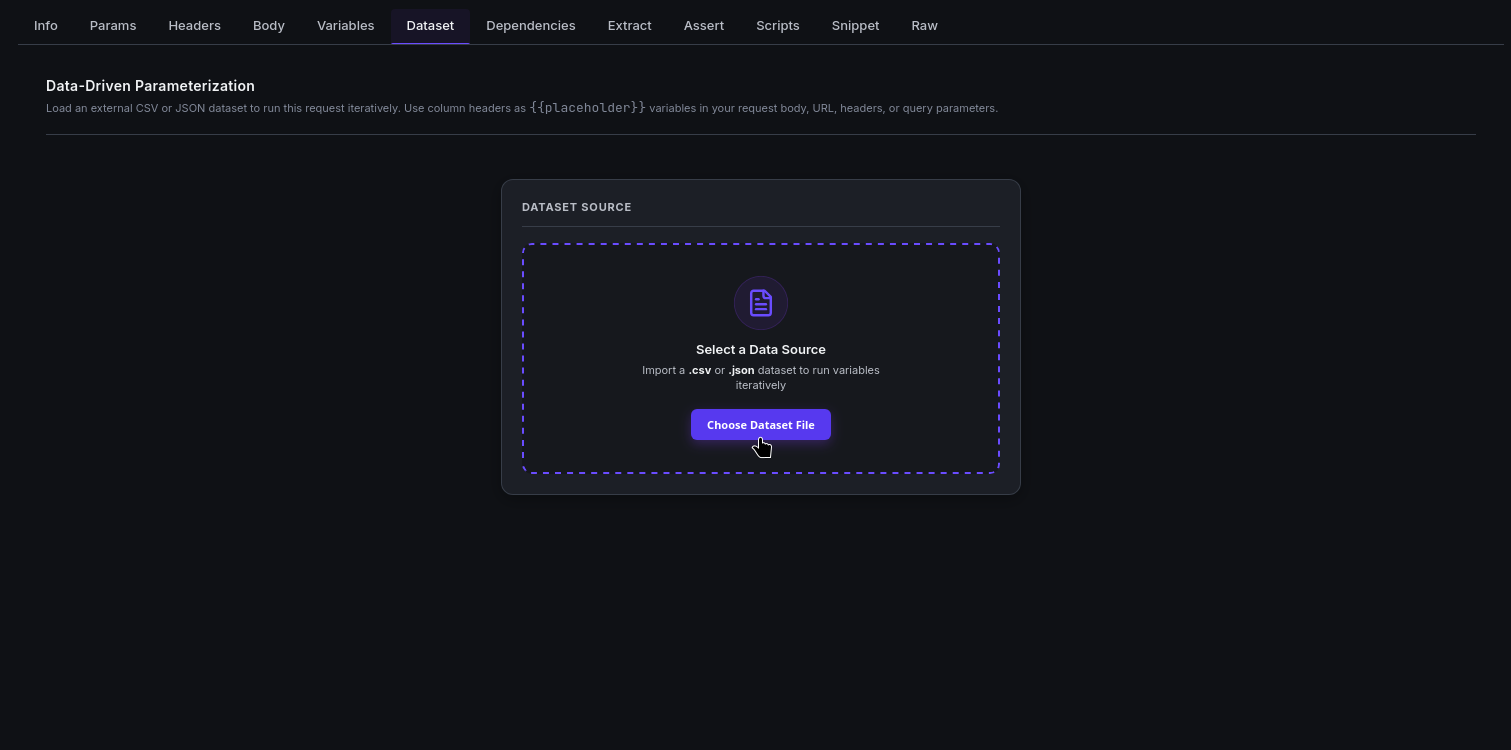
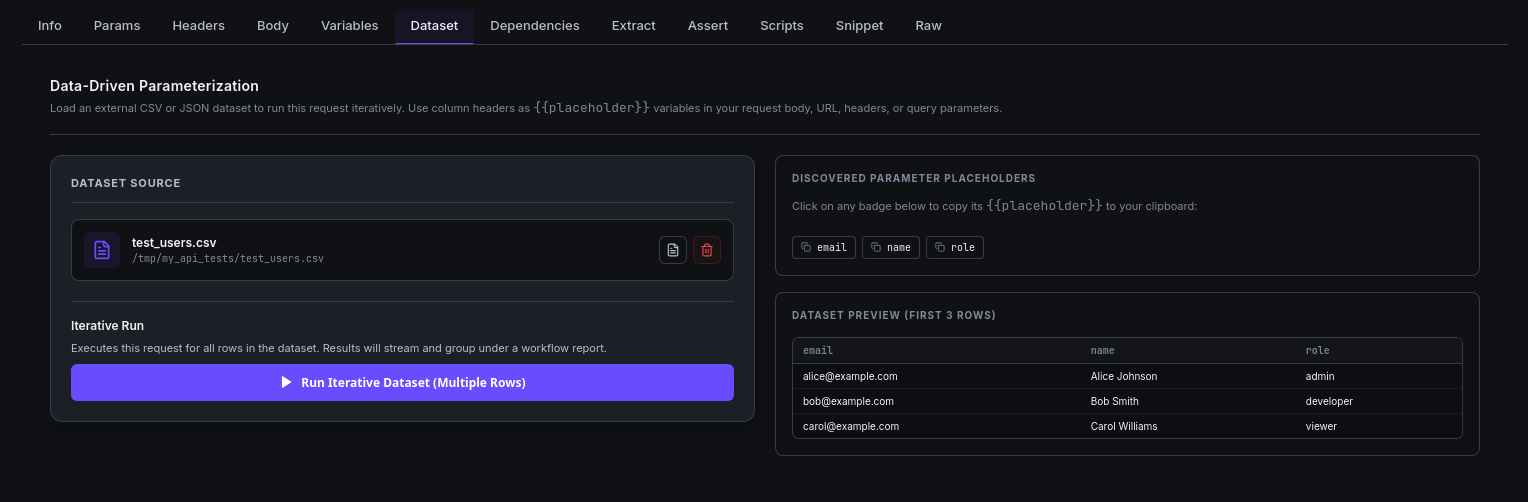
Loading Datasets
- Supported Formats: External
.csvfiles (comma-separated with header row) and.jsonfiles (flat array of JSON objects). - Selection Methods:
- Click Choose Dataset File to open the native system file dialog.
- Drag and Drop: Drag any
.csvor.jsonfile from the Left Sidebar Explorer or from your operating system desktop/file manager and drop it directly onto the upload zone.
Discovered Parameter Placeholders
Once loaded, Rumour parses the dataset headers and renders interactive placeholder badges:
- Each badge represents a column name (e.g.
user_id,email,role). - Clicking any badge instantly copies
{{column_name}}to your clipboard with a checkmark confirmation. - Use these placeholders inside your URL bar, query parameters, headers, or JSON body.
Dataset Preview
Rumour renders a tabular preview showing the first 3 rows of data, allowing you to verify parsing accuracy, column headers, and data alignments before execution.
Iterative Run Workflow
Clicking the Run Iterative Dataset button executes the request across every record in the dataset:
- Results stream live into an execution report grouped under a unified workflow run.
- Each iteration records individual response payloads, status codes, assertion outcomes, and latency metrics.
Backing TOML Representation
[stress_test_data]
file = "test_users.csv"
2. Declared Dependencies (Dependencies Tab)
Rumour replaces complex orchestrator glue code and manual test scripts with declarative dependency DAG wiring:
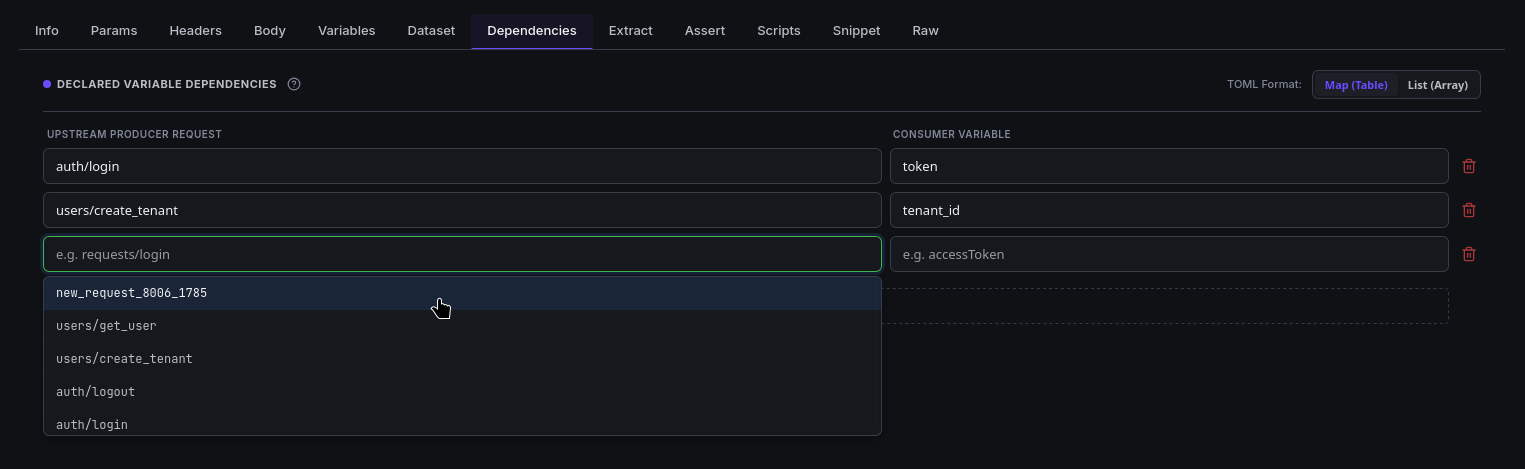
Why Declare Dependencies?
When profile.toml consumes an authorization token produced by login.toml:
- You do not need to manually run
login.tomlfirst. - You do not need to copy and paste tokens.
- If the token expires or the server returns
401 Unauthorized, the Self-Healing engine automatically re-executeslogin.tomland retriesprofile.toml.
Configuring Dependencies
- Upstream Producer Autocomplete: The Upstream Producer Request field automatically scans your workspace and autocompletes relative paths to other
.tomlrequests (e.g.auth/login,users/create_tenant). - Consumer Variable Autocomplete: When you select an upstream producer request, Rumour dynamically parses that producer's
.tomlfile on disk and auto-suggests the variables defined in its[extract]table (e.g.token,user_id,tenant_id)!
Dual TOML Formats
Rumour supports two interchangeable TOML syntax formats, configurable via the tab's TOML Format toggle:
1. Map Format (Table)
Concise key-value table mapping the producer path to the consumed variable(s):
[dependencies]
"auth/login" = "token"
# Consuming multiple variables from the same producer:
"users/create_tenant" = ["tenant_id", "admin_email"]
2. List Format (Array of Tables)
Explicit array of tables ideal for verbose documentation or structured tooling:
[[dependencies]]
producer_id = "auth/login"
consumer_var = "token"

[[dependencies]]
producer_id = "users/create_tenant"
consumer_var = "tenant_id"
3. Dynamic Extractions (Extract Tab)
The Extract tab captures values from response payloads, HTTP headers, or status codes and stores them into runtime session scope for downstream requests:
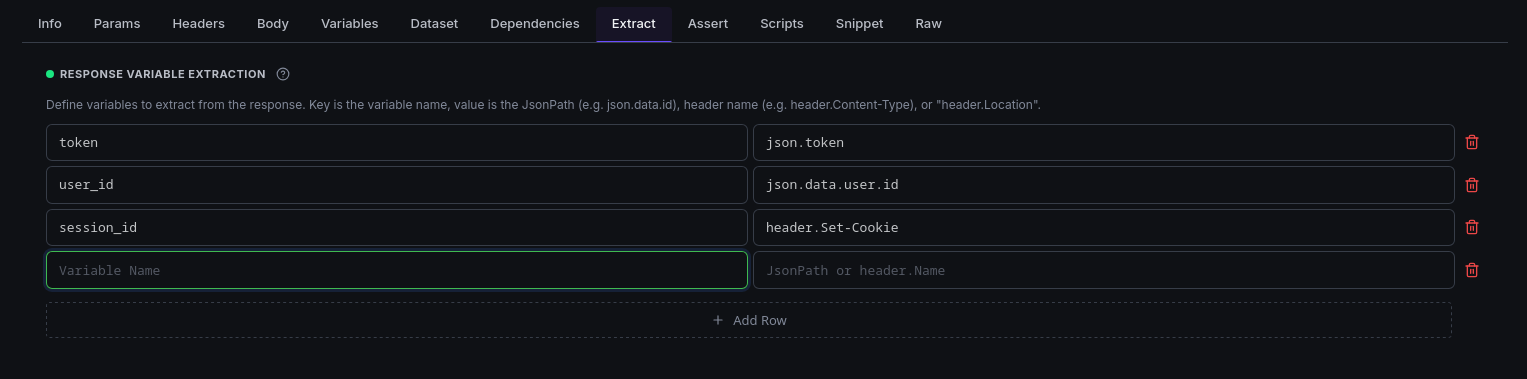
Extraction Target Selectors
In the Extract key-value table:
- Key: The target session variable name (e.g.
auth_token,created_user_id). - Value: The path expression targeting the response:
- JSONPath: Dot-notated path or standard JSONPath syntax targeting the JSON response body:
json.tokenjson.data.user.idjson.data.items[0].id$.data.token
- Response Headers: Prefix header names with
header.to capture HTTP response headers:header.Authorizationheader.Content-Typeheader.Location(captures redirect URLs)header.Set-Cookie(captures session cookies)
- GraphQL Payloads: GraphQL responses nest payload trees under
json.data.*(e.g.json.data.profile.idorjson.errors[0].message).
- JSONPath: Dot-notated path or standard JSONPath syntax targeting the JSON response body:
Backing TOML Representation
[extract]
token = "json.token"
user_id = "json.data.id"
redirect_location = "header.Location"
session_cookie = "header.Set-Cookie"
4. Response Assertions & Validation (Assert Tab)
The Assert tab provides an automated test validation engine to evaluate response correctness:
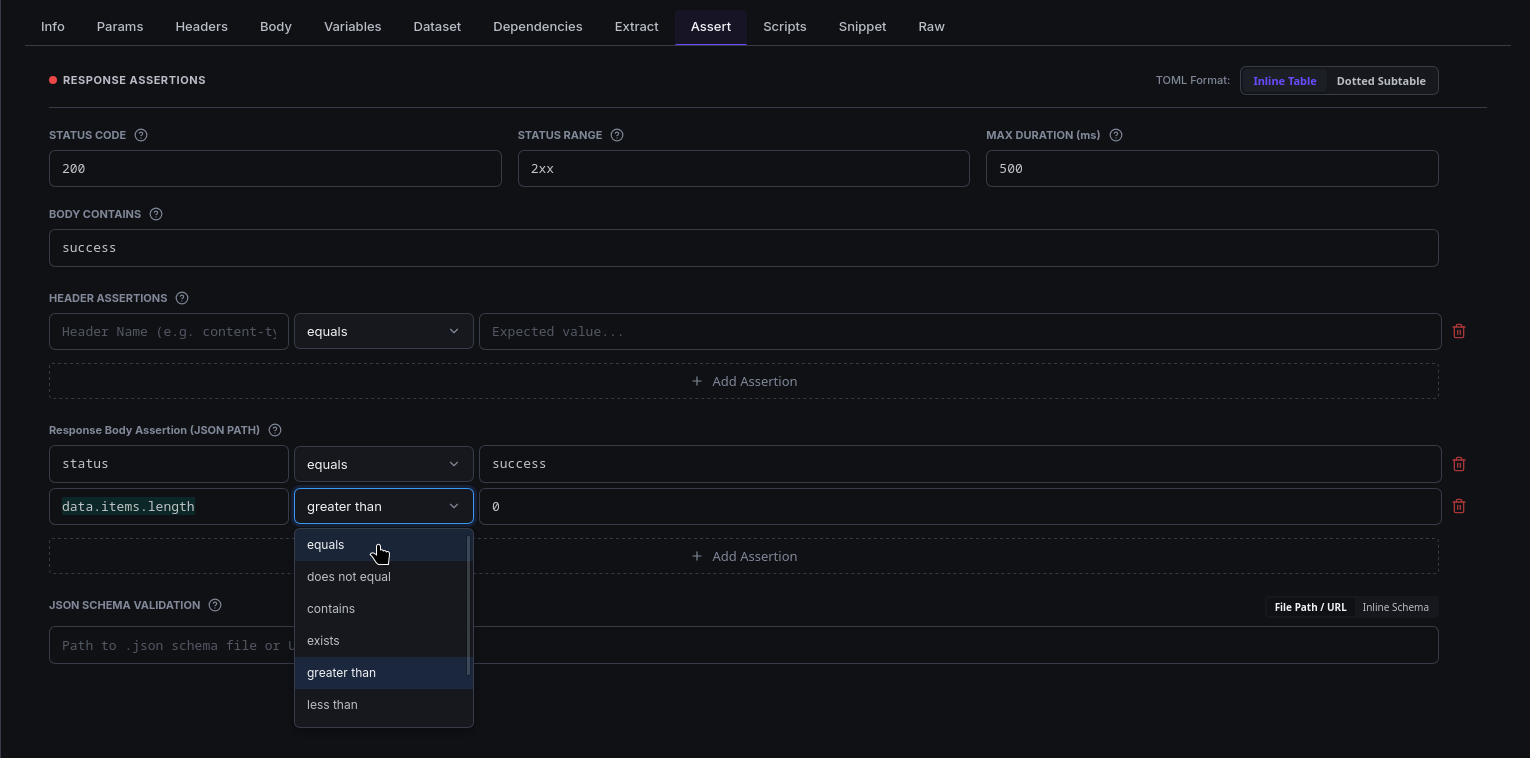
Built-in Quick Validation Fields
- Status Code: Exact numeric HTTP status code (e.g.
200,201,204). - Status Range: Numeric range or pattern (e.g.
2xx,200-299,200, 201, 204). - Max Duration (ms): Enforces latency SLAs (e.g.
duration <= 500). - Body Contains: Substring presence verification across the raw response payload.
- Protocol-Specific Validations:
- GraphQL: Assert No GraphQL Errors (
graphql_errors = true) fails if the response contains top-level"errors". - gRPC: Expected gRPC Status dropdown (
0 - OK,1 - CANCELLED, ...,16 - UNAUTHENTICATED).
- GraphQL: Assert No GraphQL Errors (
Header & JSON Path Assertion Tables
The Header and JSON Path assertion tables allow building granular criteria using intuitive operator dropdowns:
| Operator | Label | Runtime Evaluation | Backing TOML Syntax |
|---|---|---|---|
equal | equals | Strict equality comparison | "json.status" = { equal = "active" } |
not_equal | does not equal | Inequality comparison | "json.role" = { not_equal = "guest" } |
contains | contains | Substring check or array inclusion | "json.message" = { contains = "success" } |
exists | exists | Checks presence of a key/field | "json.data.token" = { exists = true } |
greater_than | greater than | Numeric strictly greater comparison | "json.data.total" = { greater_than = 0 } |
less_than | less than | Numeric strictly less comparison | "duration" = { less_than = 1000 } |
regex | matches regex | Regular expression evaluation | "json.email" = { regex = "^[\\w-\\.]+@([\\w-]+\\.)+[\\w-]{2,4}$" } |
custom | custom | Compound inline TOML sub-table | "json.code" = { in = [200, 201] } |
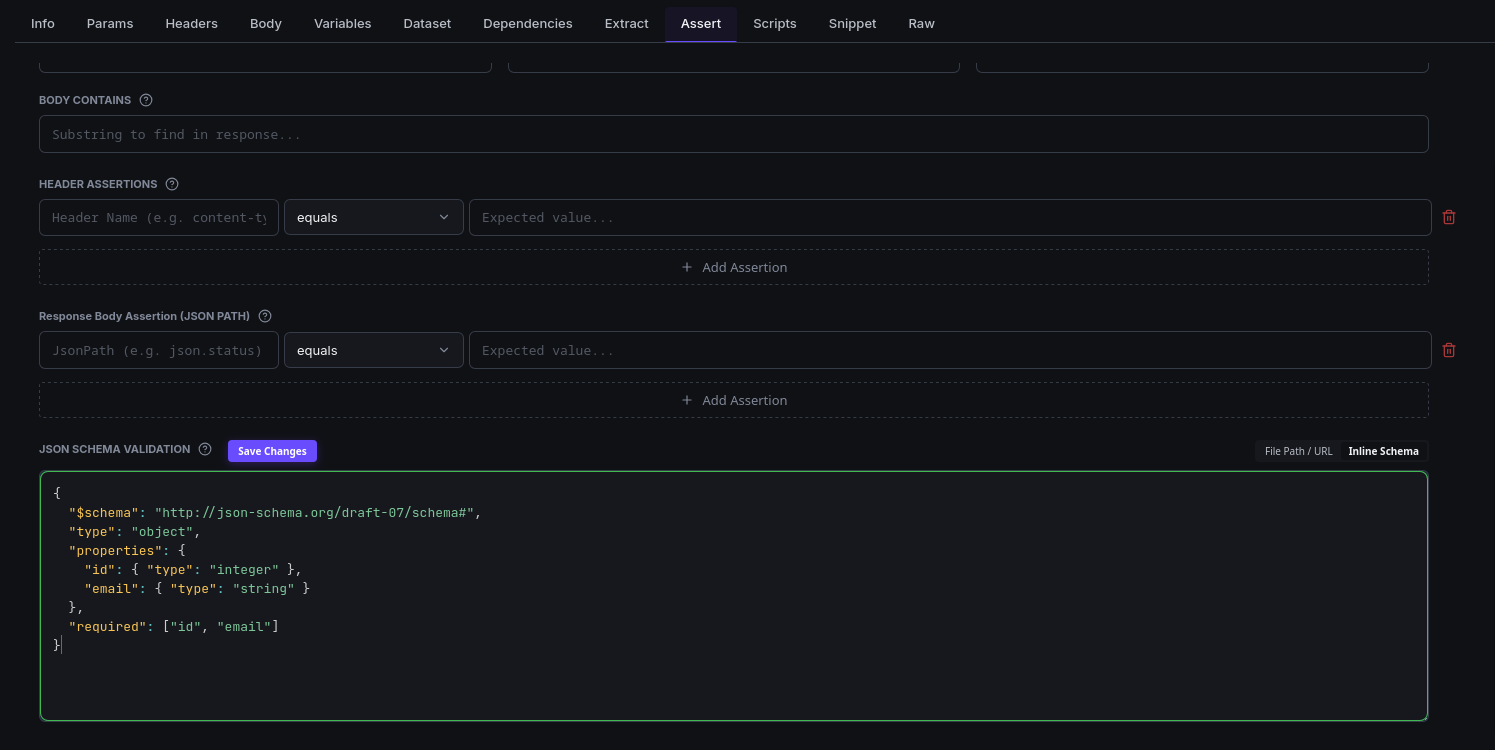
JSON Schema Validation
Validate the entire response payload against a formal JSON Schema (Draft-07):
- File Path / URL: Point to a local schema file (
schemas/user.schema.json) or remote HTTP URL. - Inline Schema: Embedded Monaco JSON editor with syntax validation pre-populated with schema boilerplate.
Dual TOML Assertion Formats
Switch between Inline Table and Dotted Subtable via the header toggle:
# Inline Table Format
[assert]
status = 200
status_range = "2xx"
duration = 500
body_contains = "success"

[assert.json]
"json.status" = { equal = "success" }
"json.data.count" = { greater_than = 0 }

[assert.headers]
"content-type" = { contains = "application/json" }
5. Rhai Scripting & Lifecycle Hooks (Scripts Tab)
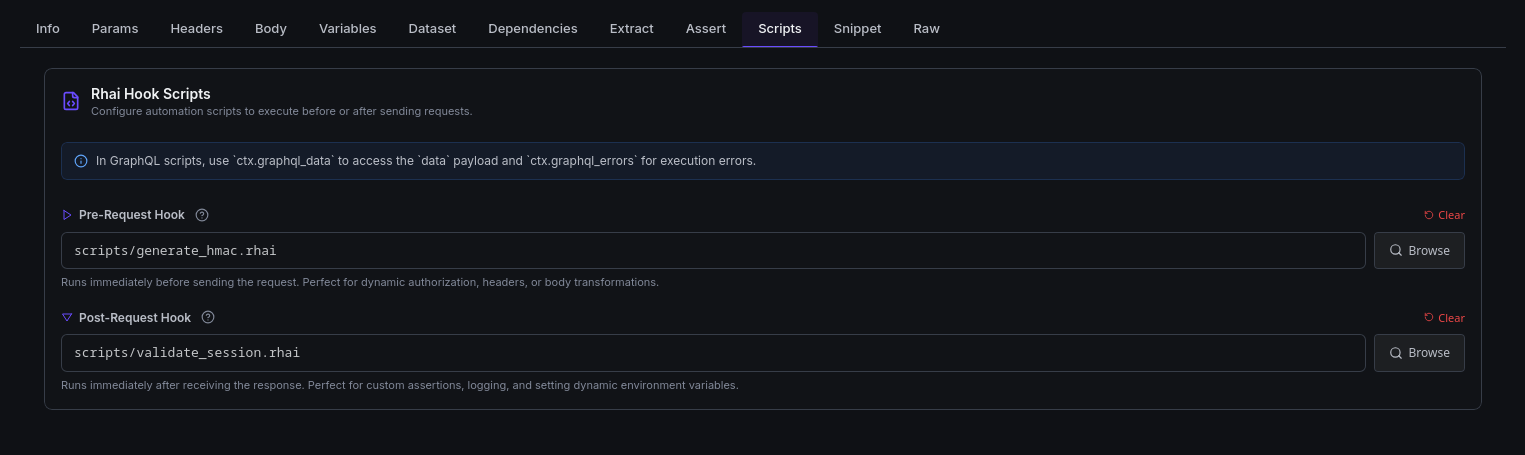
Rumour integrates an embedded Rhai scripting engine (.rhai) for advanced programmatic requirements:
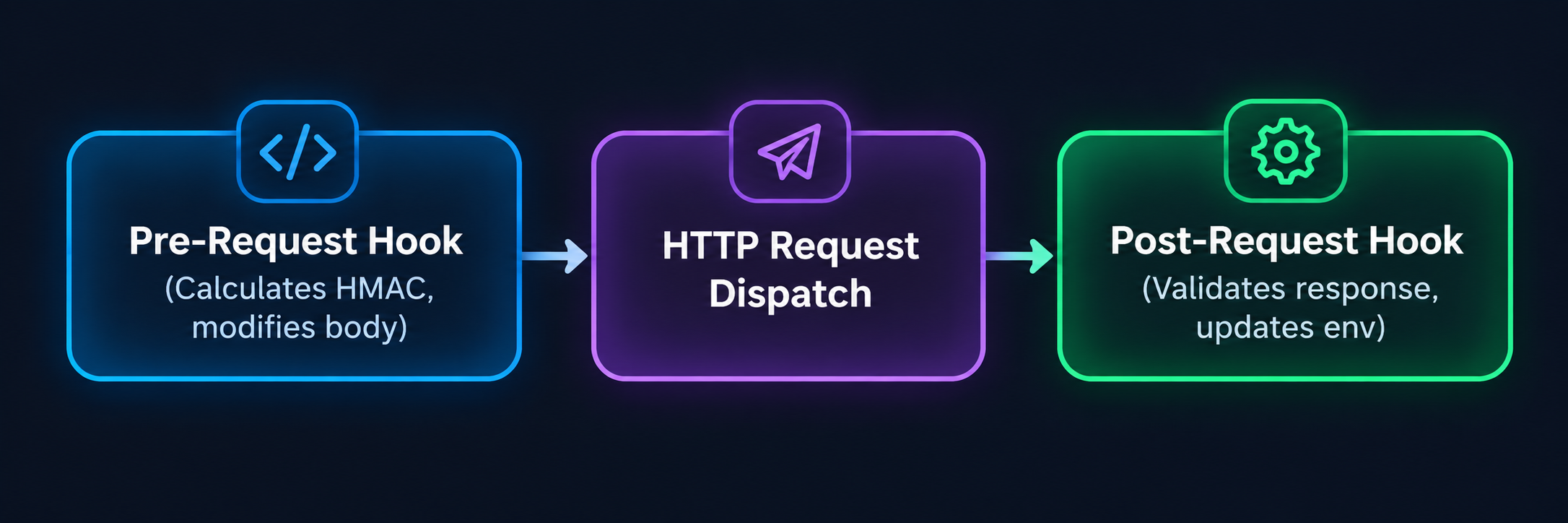
Script Execution Lifecycle
- Pre-Request Hook: Executes immediately before sending the request. Perfect for dynamic cryptographic signatures (HMAC-SHA256), nonce generation, or dynamic payload transformations.
- Post-Request Hook: Executes immediately after receiving the response. Ideal for custom business validations, state assertions, audit logging, or programmatic variable exports.
Selecting & Browsing Scripts
- Type relative script paths directly (e.g.
scripts/sign_hmac.rhai). - Click Browse to open the native file dialog filtered to
*.rhaifiles. Rumour automatically calculates the relative path from the current request file.
Protocol Scripting Context (ctx)
Rhai scripts have access to a rich ctx runtime object adapted per protocol:
- HTTP:
ctx.headers,ctx.status,ctx.body - gRPC:
ctx.grpc_metadata,ctx.grpc_status - GraphQL:
ctx.graphql_data,ctx.graphql_errors - WebSocket:
ctx.ws_message,ctx.ws_messages - MQTT:
ctx.mqtt_topic,ctx.mqtt_payload
Backing TOML Representation
pre_request = "scripts/auth_signer.rhai"
post_request = "scripts/verify_payload.rhai"
6. Scoped Variables (Variables Tab)
The Variables tab gives developers complete visibility and control over variable scoping:
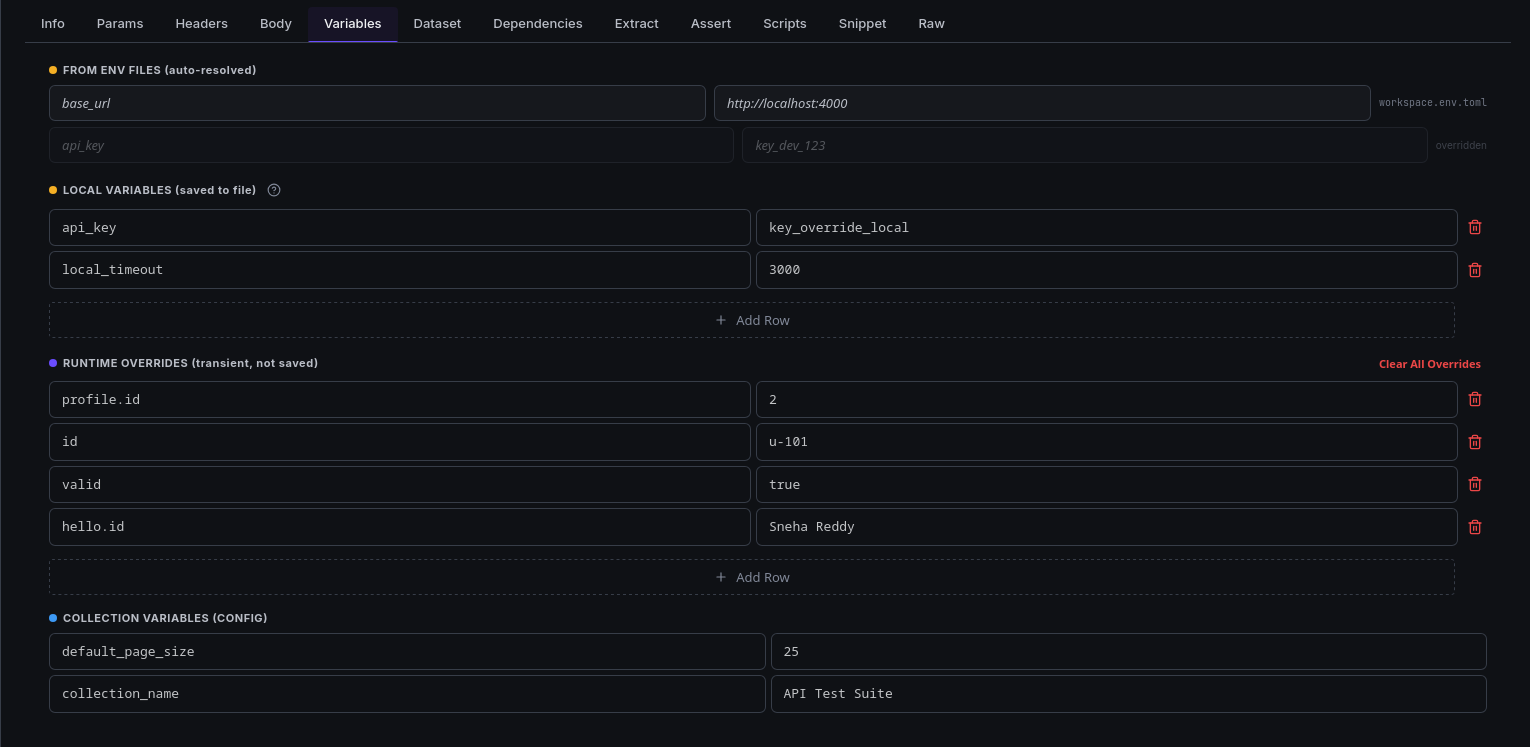
- From Env Files: Shows all global variables resolved from
workspace.env.tomlor stage files (dev.env.toml). Displays the winning source badge (e.g.workspace.env.toml) or anoverriddenbadge if a higher-precedence scope replaces it. - Local Variables: Key-value table saved directly to the active request's
.tomlunder[variables]. - Runtime Overrides: In-memory transient overrides populated during interactive workflow executions. Features a Clear All Overrides button to reset state.
- Collection Variables: Read-only display of variables cascaded from parent
collection.config.tomlfiles.
Backing TOML Representation
[variables]
local_timeout = "3000"
test_user = "developer@example.com"