Execution & Behavior Controls
Directly beneath the URL bar, the Behavior Control Strip gives developers granular control over execution modes, automatic self-healing, resilience strategies, and diagnostic recording flags without needing to manually edit underlying configuration tables.
Every toggle and numeric stepper in this strip bi-directionally maps to request-level directives in your .toml file or runner configuration flags in rumour (CLI Runner).
Control Strip Layout & Taxonomy
The Behavior Control Strip is logically partitioned into two distinct functional zones:
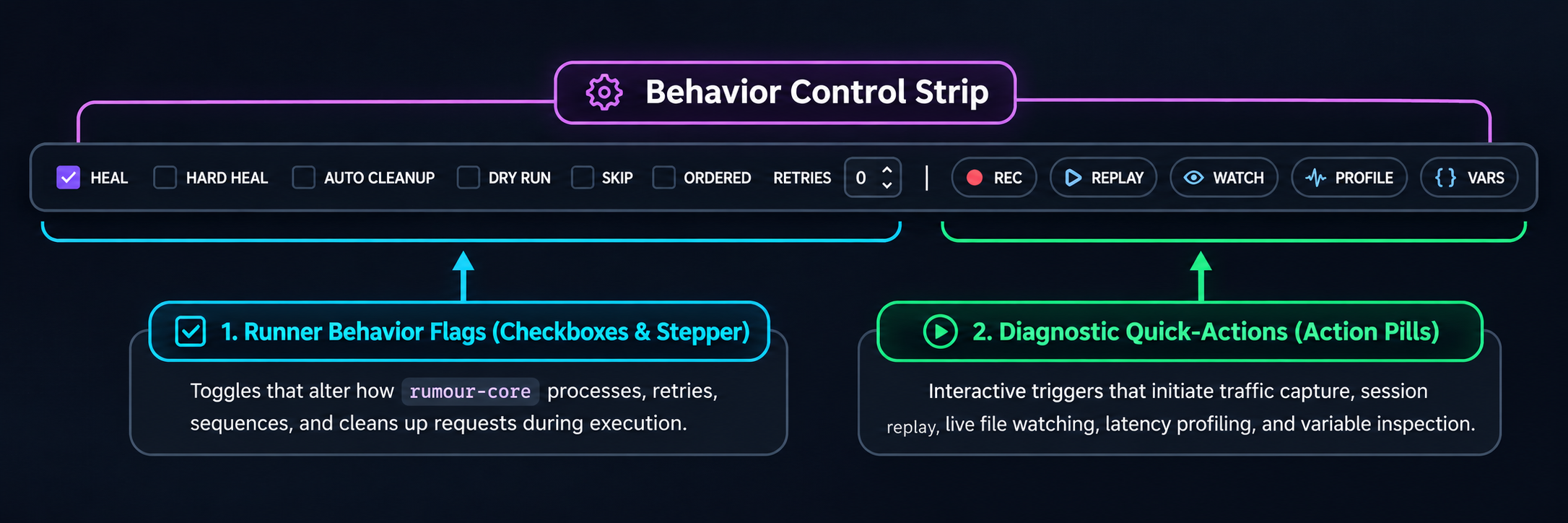
- Left Zone (Runner Behavior Flags): Toggles that alter how
rumour-coreprocesses, retries, sequences, and cleans up requests during execution. - Right Zone (Diagnostic Quick-Actions): Interactive triggers that initiate traffic capture, session replay, live file watching, latency profiling, and variable inspection.
1. Runner Behavior Flags
Each chip in the left section can be toggled via mouse click:
| Flag Chip | Backing Directive | Visual State | Default | Purpose |
|---|---|---|---|---|
| Heal | heal = true | Checkbox / Highlighted label | false | Enables intelligent runtime self-healing when encountering authentication or dependency failures. |
| Hard Heal | hard_heal = true | Checkbox / Highlighted label | false | Forces complete invalidation of cached tokens, session state, and forces fresh generation of dynamic seed values. |
| Auto Cleanup | auto_cleanup = true | Checkbox / Highlighted label | false | Registers resources created by this request in the teardown queue for automatic deletion after suite runs. |
| Dry Run | dry_run = true | Checkbox / Highlighted label | false | Validates syntax, parses templates, and checks dependencies without sending network packets over the wire. |
| Skip | skip = true | Checkbox / Dimmed text | false | Excludes this request from automated batch runs (rumour run .) while preserving manual single-click execution. |
| Ordered | ordered = true | Checkbox / Highlighted label | false | Enforces sequential execution guarantees for this node, preventing concurrent race conditions in parallel runner pools. |
| Retries | retries = N | Numeric Stepper (0–10) | 0 | Configures automatic retry attempts upon network dropouts or transient assertion failures. |
Detailed Flag Behaviors
1. HEAL (Intelligent Self-Healing Engine)
In enterprise API workflows, tests frequently fail due to stale authentication tokens, expired sessions, or transient authorization errors. Rather than failing the entire test suite, Rumour's Self-Healing Engine intercepts recovery points automatically:
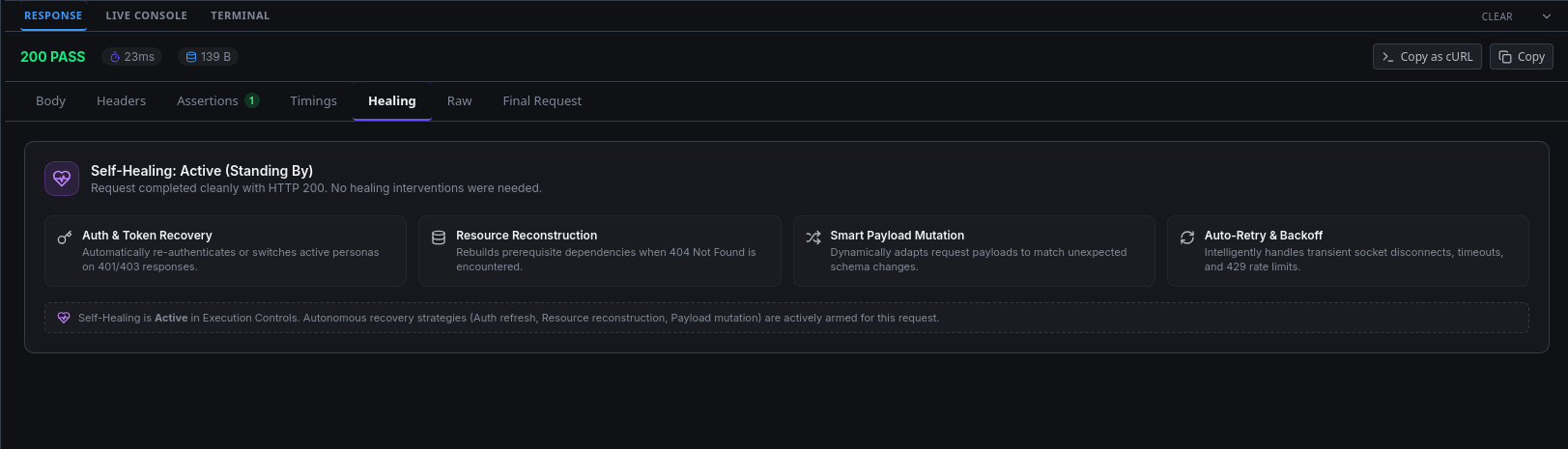
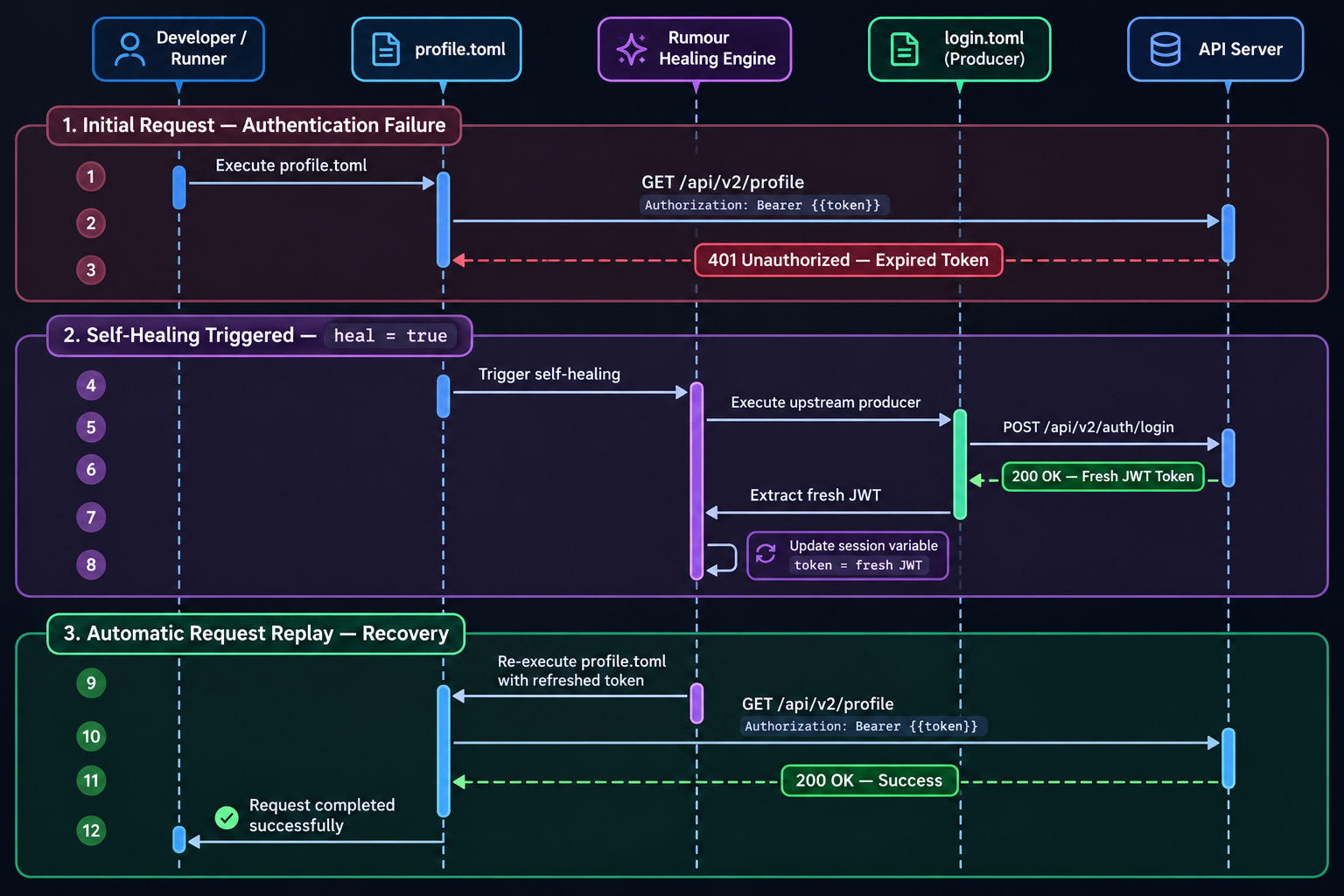
- Runtime Effect: If this request fails with an HTTP
401 Unauthorized, Rumour traverses the upstream dependency graph, identifies the authentication producer node (login.toml), re-executes it, extracts fresh credentials, and replays the original request. - Diagnostics: Self-healing events are logged directly in the Healing tab of the Bottom Response Panel, displaying the original failure, the remediation step, and the final recovery outcome.
2. HARD HEAL (Force Full Regeneration)
While standard healing re-uses cached variables where possible, Hard Heal forces a complete system wipe for the target node:
- Cache Clearance: Flushes all cached authentication tokens and session variables from memory.
- Dynamic Seed Regeneration: Re-evaluates all dynamic generators such as
{{$guid}},{{$timestamp}}, and Faker functions ({{faker.internet.email}}). - Use Case: Eliminates
409 Conflictdatabase constraint errors caused by attempting to re-use previously generated unique usernames, emails, or IDs.
3. AUTO CLEANUP (Automated Resource Teardown)
Automated testing often creates orphaned entities in staging databases (test tenants, created users, uploaded files).
- When
auto_cleanup = trueis enabled, Rumour marks resources created by this request for automated deletion. - Upon test suite completion, the runner executes the associated cleanup teardown nodes (e.g.
DELETE /api/v2/users/{{created_id}}), preventing test database clutter.
4. DRY RUN (Non-Destructive Validation)
Allows developers to verify requests safely without executing real network side-effects:
- Resolves all template variables against active environments (
workspace.env.toml,.env.toml). - Verifies upstream producer-consumer dependency resolution.
- Validates TOML schema correctness, parameter formatting, and body syntax.
- Safety: Safe for testing destructive requests (
DELETE /api/v1/database, bulk updates, or production endpoints).
5. SKIP
- Purpose: Temporarily disables a request during suite runs without deleting the file or removing it from your project.
- Suite Behavior: When running
rumour run .or executing a collection workflow, skipped requests are bypassed with a yellowSKIPPEDindicator in the workflow report. - Manual Execution: You can still execute a skipped request at any time by clicking the green Run button directly in the Request Builder.
6. ORDERED
- In multi-threaded test runs where requests execute concurrently across worker pools, race conditions can occur if dependent resources are being modified simultaneously.
- Setting
ordered = trueguarantees that this request will only execute after all prior steps and dependencies have fully completed, maintaining deterministic sequence order.
7. RETRIES (Numeric Stepper)
- Defines the maximum number of automated retry attempts (0 to 10) before marking the request as failed.
- Evaluates retries on network disconnects, TCP timeouts, and assertion failures.
2. Diagnostic Quick-Action Triggers
The right side of the control strip hosts specialized diagnostic triggers:
1. REC (Traffic Recording)
- Action: Clicking
RECopens a file save dialog prompting you to choose a target recording file (e.g.rumour_session_record.json). - Operation: Once active, the
RECpill displays a glowing red recording circle. Outgoing HTTP requests, resolved variable states, raw response streams, and latency metrics are captured into the JSON fixture. - Use Case: Creating realistic mocked fixtures for offline testing, team bug reproduction, and audit snapshots.

2. REPLAY (Deterministic Traffic Replay)
- Action: Clicking
REPLAYopens a file picker to select a previously recorded session fixture (*.json). - Operation: Replays network transactions offline without dispatching live packets to the target server.
- Use Case: Offline development, verifying assertion changes against frozen responses, and continuous regression testing in isolated sandbox environments.
3. WATCH (Live File-Watch Mode)
- Action: Toggles continuous filesystem monitoring for the active request and its dependent environments.
- Operation: When enabled (cyan pill highlight), Rumour attaches a file watcher to the
.tomlfile. Whenever you save changes to the file in external editors (e.g. VS Code, Vim, or a Git checkout), Rumour immediately re-executes the request and updates the Response Panel in real time.
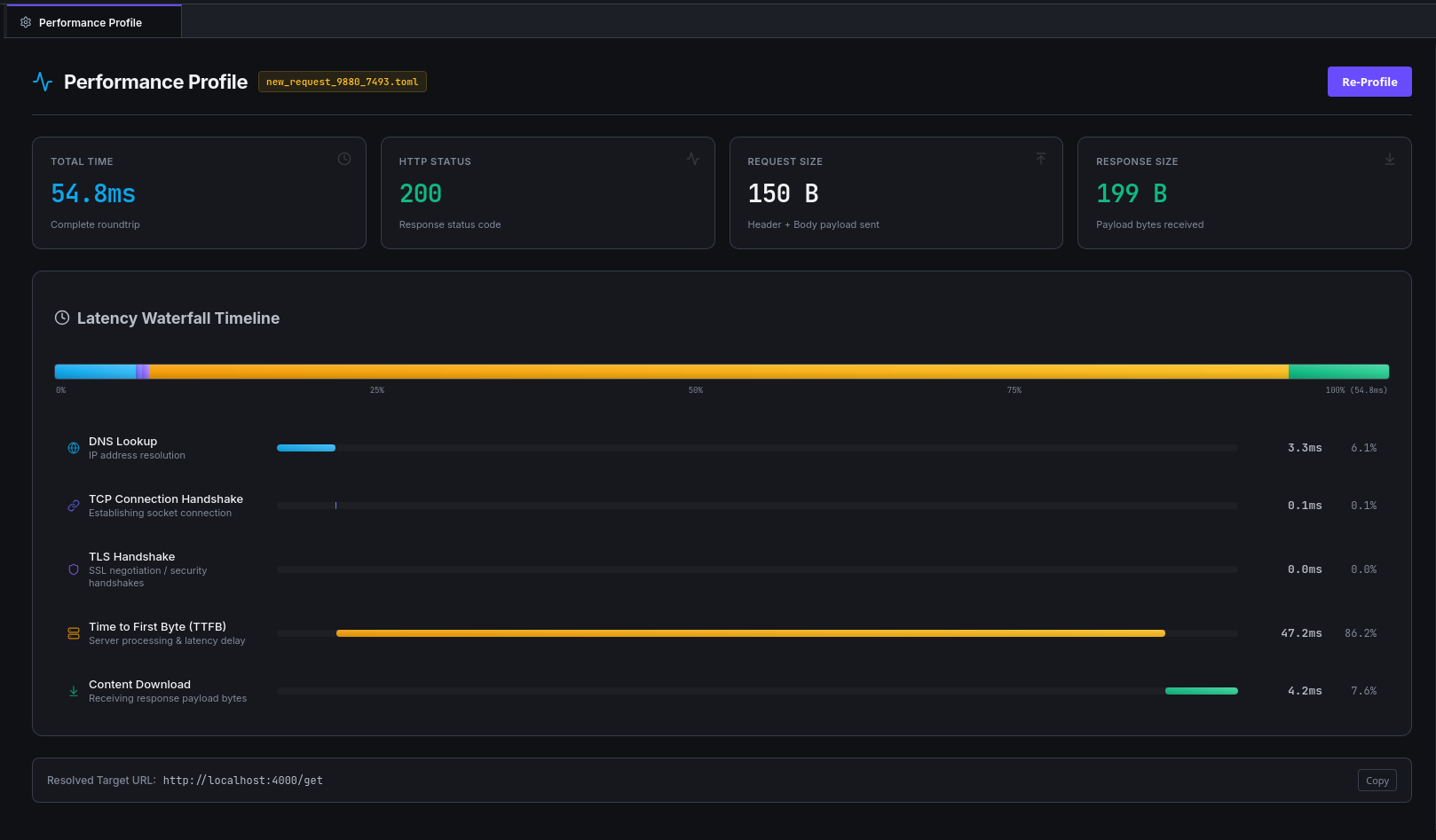
4. PROFILE (Granular Latency Profiling)
- Action: Opens the Profile Lab drawer for the active request.
- Operation: Dispatches the request through high-precision network instrumentation to record microsecond-level timing breakdowns:
- DNS Lookup: Time spent resolving hostnames.
- TCP Handshake: Connection establishment time.
- TLS Handshake: SSL/TLS certificate verification and cipher negotiation.
- TTFB (Time to First Byte): Server processing duration.
- Content Transfer: Time spent streaming the response payload.
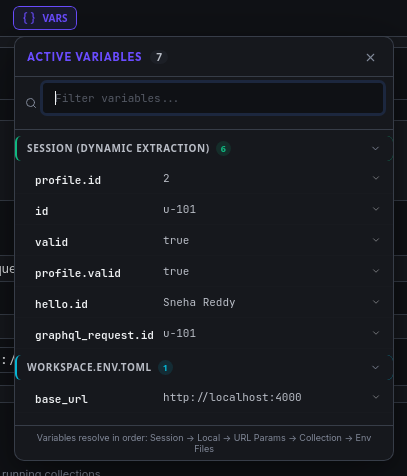
5. VARS (Active In-Scope Variable Flyout)
- Action: Clicking
VARStoggles an anchored flyout window directly beneath the button. - Operation: Displays all variables currently visible to this request, their fully evaluated values, and their source origin (e.g.,
workspace.env.toml, subfolder.env.toml, local request variables, or upstream session extractions). - Pro Tip: Use the flyout to verify variable values immediately before running requests.
Backing TOML Representation
Runner flags configured in the Behavior Control Strip serialize into the root table of the .toml file:
name = "Update User Profile"
skip = false
ordered = true
retries = 3
heal = true
hard_heal = false
auto_cleanup = true
dry_run = false

[request]
method = "PUT"
url = "{{base_url}}/api/v2/users/{{user_id}}"

[headers]
"Content-Type" = "application/json"
"Authorization" = "Bearer {{auth_token}}"

[body]
type = "json"
raw = '''
{
  "name": "Jane Smith",
  "title": "Principal Engineer"
}
'''
Cross-Module Integration
The Behavior Control Strip works seamlessly with other Rumour subsystems:
- Workflow Settings (Right Inspector): Global runner settings (worker concurrency, throttle delay, pause on error) cooperate with individual request flags. For example, if a workflow worker pool encounters an
ordered = truerequest, it temporarily suspends parallel tasks until that request completes. - Healing Tab (Bottom Response Panel): When
heal = truerecovers an authentication failure, the execution sequence and re-authenticated token renewal are detailed in the Response Panel's Healing log. - Active Variables Tab (Right Inspector): Changes to runtime variables during execution immediately reflect in both the
VARSflyout and the Right Inspector Variables tree.