Accounts & Cloud Sync
The Accounts & Sync tab (<User size={16} />) centralizes developer profiles and third-party platform integrations. It enables one-click publishing of local Rumour workspaces to GitHub, remote repository cloning, and authenticated push/pull operations directly from the user interface.
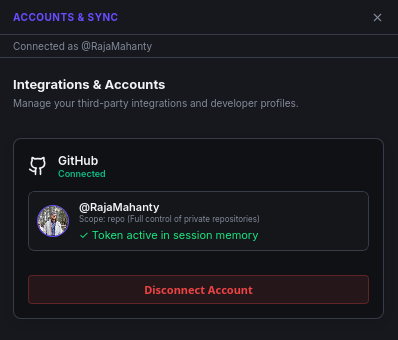
1. UI Layout & Functional Architecture
The Accounts panel manages credentials and active cloud sessions:
| UI Zone | Component | Purpose |
|---|---|---|
| Panel Header | accountsHeader | Displays section title (Integrations & Accounts) and contextual guide. |
| GitHub Brand Card | accountCardGithub | Card container encapsulating authentication status, avatar, and credentials. |
| Connection Status | brandStatus | High-visibility status badge (Connected in green or Not connected in muted gray). |
| Profile & Scope | githubUserDetails | Displays authenticated GitHub avatar, @handle, and verified permission scopes (repo). |
| Session Memory State | githubScopeInfo | Real-time security indicator confirming whether the PAT is active in volatile RAM (✓ Token active in session memory) or pending reactivation. |
| Authentication Form | tokenInputWrapper | Secure masked password field and quick link to GitHub's PAT generator. |
2. GitHub Integration & Authentication
Rumour integrates natively with GitHub to enable seamless collaboration and backup of your file-backed API workspaces without requiring external Git CLI configuration.
Personal Access Token (PAT) Configuration
To connect your GitHub account:
- Generate a Personal Access Token (Classic or Fine-Grained) on GitHub with standard
reposcope permissions. - Enter the token into the Personal Access Token field.
- Click Connect GitHub Account (or Activate Token).
[!TIP] Quick Token Generator Click the Generate Token ↗ shortcut link directly inside the input wrapper to open GitHub in your default browser with the recommended
reposcope andRumour Desktop Appdescription pre-filled.
In-Memory Session Security Architecture
Rumour prioritizes developer credential protection through strict isolation:
- Volatile Session Memory: Sensitive Personal Access Tokens are held exclusively in transient React/application memory (
✓ Token active in session memory). - No Plaintext Disk Storage: Tokens are never persisted to disk, local
.tomlworkspace files, or unencrypted storage. - Sanitized Metadata Caching: Only public, non-sensitive metadata (username handle, avatar URL) is preserved in local storage across app restarts so you do not have to reconfigure account details.
- Session Re-Hydration: Upon restarting Rumour, the interface prompts you to re-enter your PAT (
⚠ Session token not loaded. Enter PAT below for push/pull.) to reactivate authenticated operations for that session. - Instant Revocation: Clicking Disconnect Account immediately flushes the active token from RAM, clears cached profile metadata, and returns the panel to the unauthenticated onboarding state.
3. Connected Profile Overview
Once authenticated, the GitHub integration card expands into the connected dashboard:
- User Avatar & Handle: Displays your live GitHub profile avatar alongside your
@username. - Granted Permissions: Confirms active OAuth / PAT scope (
Scope: repo (Full control of private repositories)). - Connection Status Badge: Glowing green
Connectedpill confirming verified communication with the GitHub REST API (api.github.com/user). - Disconnect Button: Quick-action trigger to terminate the session and clear credentials.
4. Cross-Tab Synergy: Publishing & Collaboration
Connecting your GitHub account automatically unlocks native cloud collaboration across Rumour UI:
One-Click Workspace Publishing (Source Control Tab)
When working in a local workspace without a configured Git remote, the Source Control tab exposes the Publish to GitHub workflow:
- Repository Name: Pre-fills with the active workspace directory name or a custom repository slug.
- Description: Optional repository description and tags.
- Visibility Toggle: Seamlessly choose between Private (recommended for internal APIs) and Public.
- Owner Selection: Choose between publishing under your personal user account or any authorized GitHub Organization (
gitHubOrgs). - Automated
.gitignoreGeneration: Bundles pre-configured ignore templates (general,node,python,rust) tailored for Rumour test suites. - One-Step Provisioning: Automatically initializes the local Git repo, creates the remote repository on GitHub via API, binds the
originremote, and pushes the initial commit.
Seamless Push & Pull Operations
- Authenticated background push and pull actions use the in-memory PAT directly, eliminating SSH key configuration and credential prompts in the terminal.