Active Variables & Lineage
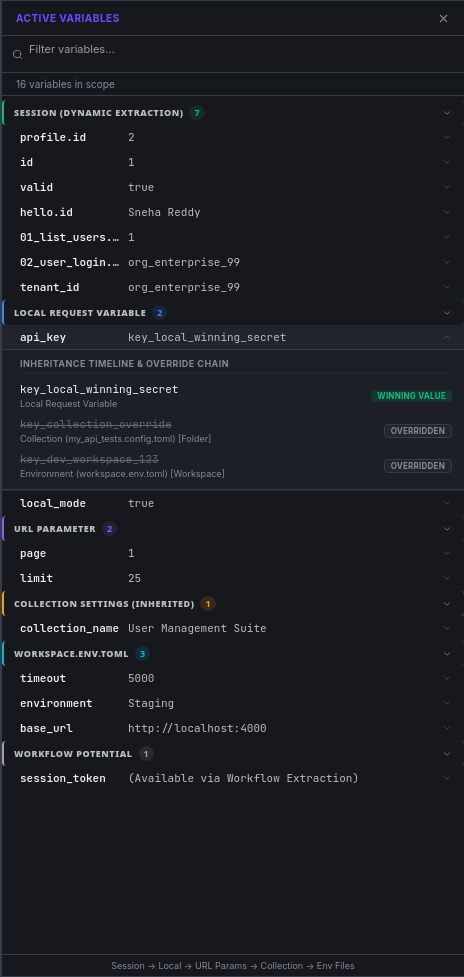
Variables in Rumour adhere to a deterministic, multi-tiered precedence hierarchy. The Active Variables tab (<Braces size={16} />) provides real-time visibility into every variable currently in scope for the active request, documenting exactly which layer defined each value and why a specific value won precedence.
1. Variable Scope Tiers
Variables are organized into collapsible accordion sections with colored accent borders and item count badges:
| Scope Tier | Accent Color | Precedence | Source Origin | Description |
|---|---|---|---|---|
Session (Dynamic Extraction) | Green (#10b981) | Highest (1) | [extract] tables, Rhai scripts | Transient variables captured from upstream responses during runtime (e.g. token, session_id). |
Local Request Variable | Blue (#3b82f6) | Tier 2 | Request [variables] table | Variables defined directly within the active .toml file. |
URL Parameter | Purple (#8b5cf6) | Tier 3 | URL query parameters | Dynamic query parameters bound to the request. |
Collection Settings (Inherited) | Amber (#f59e0b) | Tier 4 | collection.config.toml | Folder-level variables cascaded to all requests in that directory. |
Env Files | Cyan (#06b6d4) | Tier 5 | workspace.env.toml, .env.toml | Global workspace environments and stage-specific profiles. |
2. Real-Time Variable Search Filter
At the top of the Active Variables panel, an integrated search bar allows instant filtering across keys and values:
- Type key names (e.g.
base_url,token,user) to filter visible groups. - Matching count badges update automatically on each accordion header.
- If no variables match, an empty state confirms "No matches for your filter".
3. Lineage Stack & Winning Value Inspection
When a variable name is declared across multiple scopes (e.g. api_key defined in both workspace.env.toml and the request's local [variables]), Rumour evaluates precedence automatically.
Clicking any variable row expands its Lineage Stack:
api_key = key_override_local  [Local Request Variable]  (WINNING)
api_key = key_dev_123         [workspace.env.toml]      (OVERRIDDEN)
- Winning Value (
isActive): Highlighted with bold text and an active indicator tag. This is the exact value that will be interpolated into outgoing request templates. - Overridden / Shadowed Values: Displayed beneath the winning value with strikethrough formatting and source tags, explaining where lower-precedence definitions were superseded.
- Evaluation Order: The sticky panel footer continuously displays the evaluation pipeline:
Session → Local → URL Params → Collection → Env Files