Workflow Runner Settings
The Workflow Settings tab (<SlidersHorizontal size={16} />) provides central control over how batch executions, collection suites, and automated workspace workflows are dispatched by rumour-core. Developers can fine-tune concurrency worker pools, enable automated self-healing resilience, configure request throttling, and set node pause filters for step-by-step debugging.
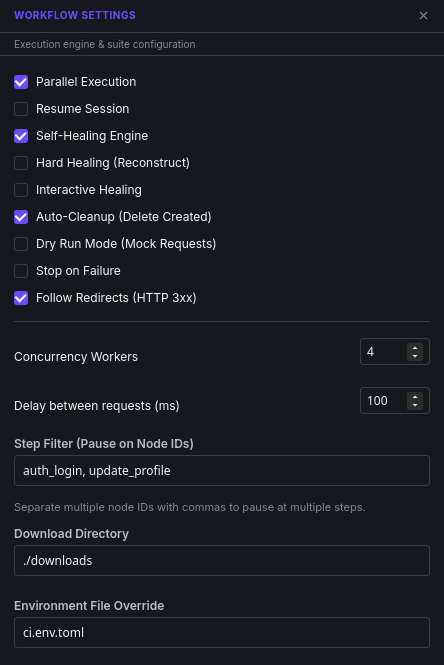
1. Engine Toggles & Runner Flags
Each checkbox toggle directly controls a runtime execution flag in the underlying runner engine:
| Engine Flag | CLI Flag | Default | Purpose & Behavioral Impact |
|---|---|---|---|
| Parallel Execution | --parallel / -P | true | Executes non-dependent requests concurrently across worker threads according to the topological DAG. |
| Resume Session | --resume / -R | false | Resumes execution from the last interrupted or failed node rather than restarting the entire workflow from scratch. |
| Self-Healing Engine | --heal / -H | false | Automatically intercepts 401 Unauthorized errors, re-executes upstream authentication producers, extracts fresh tokens, and replays failed nodes. |
| Hard Healing (Reconstruct) | --hard-heal | false | Forcefully purges cached session variables and re-evaluates all dynamic generators ({{$guid}}, Faker seeds) to resolve state conflicts. |
| Interactive Healing | --interactive / -i | false | Halts execution on failure and displays a visual prompt allowing developers to edit variables or headers manually before continuing. |
| Auto-Cleanup (Delete Created) | --auto-cleanup | false | Automatically queues teardown operations (e.g. DELETE /api/users/{{id}}) and executes them at the conclusion of suite runs. |
| Dry Run Mode (Mock Requests) | --dry-run / -d | false | Evaluates template syntax, resolves variables, and validates schemas without transmitting network packets over the wire. |
| Stop on Failure | --stop-on-fail | false | Immediately aborts the remaining execution queue upon encountering the first failed assertion. |
| Follow Redirects (HTTP 3xx) | --follow-redirects | true | Automatically traverses HTTP 301, 302, and 307 redirects during automated suite executions. |
2. Execution Tuning Parameters
Beneath the engine flags, numeric inputs and path fields allow fine-grained performance tuning:
Concurrency Workers
- Control: Numeric stepper (
1to64threads). - CLI Equivalence:
--concurrency <N>or-c <N>. - Controls the maximum number of requests that can be dispatched simultaneously in parallel execution pools.
- Set to
1for strict sequential step-by-step debugging, or higher values (4to16) for load testing and fast suite execution.
Delay between Requests (delay_ms)
- Control: Numeric stepper in increments of
100ms. - CLI Equivalence:
--delay <ms>. - Introduces an artificial pause between outgoing requests to prevent rate-limiting (HTTP
429 Too Many Requests) from third-party APIs.
Step Filter (Pause on Node IDs)
- Control: Text input field.
- CLI Equivalence:
--step-filter <nodes>. - Comma-separated list of request node names or paths (e.g.
auth_login, update_profile). - When the runner reaches a matching node, execution automatically pauses, allowing developers to inspect variable state in the Response Panel before proceeding.
Download Directory
- Control: Filesystem directory path.
- CLI Equivalence:
--download-dir <path>. - Destination folder where file downloads, binary exports, and test artifacts will be saved during workflow runs (e.g.
./downloads).
Environment File Override
- Control: Path to an alternative environment file.
- CLI Equivalence:
--env <path>or-e <path>. - Specify an alternative environment file (e.g.
ci.env.tomlorstaging.env.toml) to override the defaultworkspace.env.tomlwithout modifying project configuration files.
3. Global vs Request-Level Directives
Workflow Settings configured in the Right Inspector govern suite-level and workspace-level execution. When individual .toml requests define explicit behavior directives, Rumour resolves precedence deterministically:
- If a request specifies
ordered = true, the runner halts parallel pool dispatch for that node and executes it sequentially, even if Parallel Execution is globally enabled. - If a request specifies
skip = true, automated workflow runs bypass that node regardless of global runner settings. - If a request specifies
follow_redirects = false, redirects are halted specifically for that endpoint.